Choosing a new keyboard sounds simple until you realize there are dozens of different sizes available. Full-size keyboards, TKL keyboards, 75% layouts, 65% keyboards, 60% keyboards, and even ultra-compact designs all offer different advantages.
If you’re wondering, “What size keyboard should I get?”, the answer depends on how you use your computer, how much desk space you have, and which keys you actually need every day.
In this guide, you’ll learn exactly what each keyboard size offers, the pros and cons of each layout, and how to choose the best keyboard size for your needs.
Why Keyboard Size Matters
Many people focus on switches, RGB lighting, or wireless connectivity when shopping for a keyboard. However, keyboard size can have a bigger impact on your daily experience than almost any other feature.
The size of your keyboard affects:
- Comfort and ergonomics
- Available desk space
- Mouse movement room
- Portability
- Productivity
- Gaming performance
- Learning curve
A keyboard that’s too large may waste valuable desk space, while one that’s too small may remove keys you frequently use.
The goal is finding the smallest keyboard that still includes the keys you need.
Understanding Keyboard Sizes
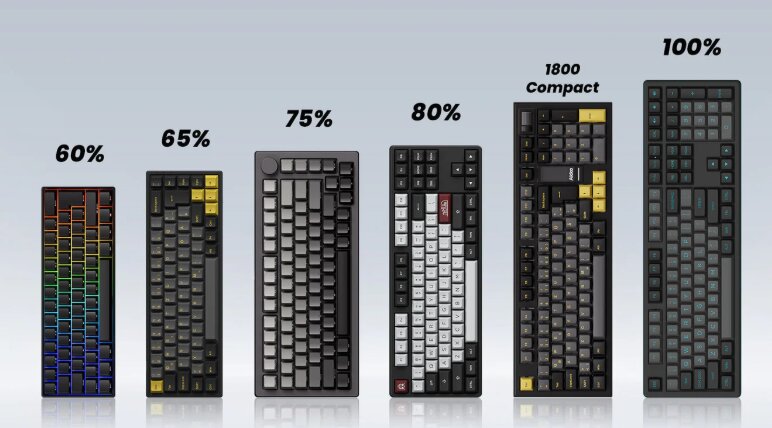
Keyboard sizes are usually described as a percentage of a traditional full-size keyboard.
The lower the percentage, the more keys have been removed.
Here are the most common keyboard sizes:
| Keyboard Size | Approximate Keys |
|---|---|
| Full Size (100%) | 104-108 |
| 1800 Compact (96%) | 96-100 |
| TKL (80%) | 87-88 |
| 75% | 80-84 |
| 65% | 66-68 |
| 60% | 60-61 |
| 40% | 40-50 |
Let’s examine each one.
Full-Size Keyboard (100%)
A full-size keyboard includes:
- Function row (F1-F12)
- Arrow keys
- Navigation cluster
- Dedicated number pad
This is the keyboard layout most people grew up using.
Pros
- Complete key set
- Dedicated number pad
- No learning curve
- Excellent for spreadsheets and data entry
- Great for office productivity
Cons
- Takes up the most desk space
- Less room for mouse movement
- Not portable
Best For
- Accountants
- Data entry professionals
- Financial analysts
- Office workers
- Users who frequently enter numbers
If you use Excel all day or regularly work with numerical data, a full-size keyboard is often the best choice.
96% Keyboard (1800 Compact)
A 96% keyboard keeps nearly all the keys of a full-size layout but compresses them into a smaller footprint.
You still get:
- Number pad
- Function row
- Arrow keys
However, the keys are positioned closer together.
Pros
- Keeps the number pad
- Saves desk space
- More ergonomic than full-size
Cons
- Layout may feel unfamiliar initially
- Fewer model options available
Best For
- Productivity users
- Office workers
- Users who want a number pad without a giant keyboard
Many enthusiasts consider 96% layouts the ideal compromise between functionality and size.
Tenkeyless Keyboard (TKL / 80%)
A TKL keyboard removes the number pad while keeping:
- Function keys
- Navigation keys
- Arrow keys
This is one of the most popular keyboard sizes today.
Pros
- More desk space
- Better mouse positioning
- Easy transition from full-size
- Excellent balance of features
Cons
- No dedicated number pad
Best For
- Gamers
- Programmers
- Writers
- General users
If you’re unsure what size keyboard to buy, TKL is often the safest recommendation.
It removes only the least-used section of the keyboard while preserving everything else.
75% Keyboard
A 75% keyboard retains nearly all important keys but compresses them into a tighter layout.
You’ll still have:
- Function row
- Arrow keys
- Most navigation keys
Everything is simply packed closer together.
Pros
- Extremely space efficient
- Maintains productivity features
- Modern appearance
- Popular among enthusiasts
Cons
- Slightly less intuitive layout
- Keys can feel crowded initially
Best For
- Students
- Professionals
- Programmers
- Remote workers
Many people consider 75% keyboards the sweet spot between compactness and functionality.
65% Keyboard
A 65% keyboard removes:
- Function row
- Most navigation keys
But keeps:
- Arrow keys
This is one reason the 65% layout has become incredibly popular.
Pros
- Compact
- Portable
- Retains arrow keys
- More mouse space
Cons
- Requires function layers
- Missing dedicated function keys
Best For
- Casual users
- Gamers
- Minimalist desk setups
- Travelers
For many users, a 65% keyboard offers all the essential keys while significantly reducing size.
60% Keyboard
The 60% keyboard removes:
- Number pad
- Function row
- Navigation cluster
- Dedicated arrow keys
Many functions become secondary commands accessed through a function layer.
Pros
- Very compact
- Highly portable
- Maximum mouse space
- Clean appearance
Cons
- Significant learning curve
- Missing many dedicated keys
- Less ideal for productivity
Best For
- Competitive gamers
- Keyboard enthusiasts
- Frequent travelers
A 60% keyboard can be incredibly efficient once mastered, but it isn’t the best choice for everyone.
40% Keyboard
A 40% keyboard removes even more keys and relies heavily on layers.
These keyboards are primarily used by keyboard enthusiasts.
Pros
- Extremely compact
- Unique typing experience
Cons
- Steep learning curve
- Not beginner friendly
- Limited practicality
Best For
- Hobbyists
- Advanced enthusiasts
Most users should avoid 40% keyboards unless they specifically want to experiment with alternative layouts.
What Size Keyboard Is Best for Gaming?
For gaming, the most popular sizes are:
- TKL
- 75%
- 65%
These layouts provide:
- More room for mouse movement
- Better ergonomics
- Less desk clutter
Competitive FPS players often prefer smaller keyboards because they allow wider mouse movements without hitting the keyboard.
What Size Keyboard Is Best for Work?
The answer depends on your job.
Data Entry and Accounting
Choose:
- Full-size
- 96%
The dedicated number pad dramatically improves efficiency.
Programming
Choose:
- TKL
- 75%
These layouts retain important function keys while reducing desk space.
Writing and Content Creation
Choose:
- TKL
- 75%
- 65%
Most writers rarely need a number pad, making smaller layouts more comfortable.
What Size Keyboard Is Best for Small Desks?
If desk space is limited, consider:
- 75%
- 65%
- 60%
These keyboards create more room for:
- Mouse movement
- Notebooks
- Audio equipment
- Desk accessories
Many users are surprised by how much larger their workspace feels after downsizing from a full-size keyboard.
What Size Keyboard Is Best for Ergonomics?
Smaller keyboards often improve ergonomics because they reduce the distance between your keyboard and mouse.
When the mouse sits closer to your body:
- Shoulder strain decreases
- Arm movement decreases
- Overall comfort improves
For many people, TKL and 75% layouts offer the best ergonomic balance.
Questions to Ask Before Choosing a Keyboard Size
Before buying, ask yourself:
Do I use a number pad every day?
If yes:
- Full-size
- 96%
If no:
- TKL or smaller
Do I use function keys often?
If yes:
- TKL
- 75%
- Full-size
If no:
- 65%
- 60%
Do I travel frequently?
If yes:
- 65%
- 60%
Do I play FPS games?
If yes:
- TKL
- 75%
- 65%
Do I primarily work with spreadsheets?
If yes:
- Full-size
- 96%
Keyboard Size Recommendations by User Type
Best for Most People
75% Keyboard
Excellent balance of functionality and compactness.
Best for Office Work
96% Keyboard
Keeps the number pad while saving space.
Best for Gaming
TKL Keyboard
Provides extra mouse room without sacrificing functionality.
Best for Programming
75% Keyboard
Retains essential keys in a compact footprint.
Best for Travel
65% Keyboard
Portable without feeling overly restrictive.
Best for Data Entry
Full-Size Keyboard
Nothing beats a dedicated number pad for heavy numerical work.
Final Thoughts
If you’re wondering what size keyboard you should get, there is no single perfect answer. The best keyboard size depends entirely on your workflow and preferences.
For most people, a 75% keyboard offers the best combination of functionality, comfort, and desk efficiency.
If you need a number pad for spreadsheets or accounting work, choose a full-size or 96% keyboard.
If gaming is your primary focus, a TKL keyboard remains one of the most popular and practical options available.
Ultimately, the best keyboard size is the one that includes the keys you use every day while eliminating the ones you don’t.