When shopping for a mechanical keyboard, you’ll quickly run into the same question:
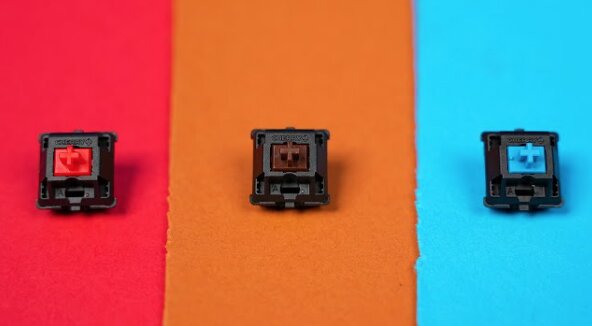
Should you choose Red, Brown, or Blue switches?
At first glance, they look nearly identical. They often come from the same manufacturer, have similar lifespans, and may even appear on the same keyboard model. Yet they feel completely different once you start typing or gaming.
The truth is that no switch type is objectively “best.” The right choice depends on how you use your keyboard, how much noise you’re willing to tolerate, and whether gaming or typing is your priority.
After years of using all three switch types across gaming, office work, content writing, and programming, I’ve found that each excels in different situations.
This guide breaks down everything you need to know about Red vs Brown vs Blue switches so you can confidently choose the right one.
Quick Answer
If you don’t want to read the entire guide:
- Red Switches: Best for gaming
- Brown Switches: Best all-around option
- Blue Switches: Best for typing enthusiasts
For most people, Brown switches are the safest choice because they balance gaming performance and typing comfort.
Red vs Brown vs Blue Switches at a Glance
| Feature | Red Switches | Brown Switches | Blue Switches |
|---|---|---|---|
| Feel | Linear | Tactile | Clicky & Tactile |
| Noise Level | Quiet | Moderate | Loud |
| Gaming Performance | Excellent | Very Good | Good |
| Typing Experience | Good | Excellent | Excellent |
| Actuation Feel | Smooth | Small Bump | Bump + Click |
| Office Friendly | Yes | Usually | Rarely |
| Learning Curve | Easy | Easy | Moderate |
| Popularity | Very High | High | Moderate |
Understanding Mechanical Keyboard Switches
Before comparing them directly, it’s important to understand what makes switches different.
Every mechanical switch contains a spring and stem that determine how the key feels when pressed.
Most switches fall into one of three categories:
Linear
The key moves straight down without any tactile feedback.
Tactile
A noticeable bump tells you when the key has activated.
Clicky
A tactile bump combined with an audible click.
This is where Red, Brown, and Blue switches fit:
- Red = Linear
- Brown = Tactile
- Blue = Clicky
Red Switches Explained
Red switches are often considered the default gaming switch.
They use a linear design, meaning the key travels smoothly from top to bottom without any bump or click.
What Red Switches Feel Like
Imagine pressing a key that slides down effortlessly.
There’s no resistance point and no click sound. The movement feels smooth throughout the entire keystroke.
For many gamers, this creates a fast and responsive experience.
Advantages of Red Switches
Fast for Gaming
Because there’s no tactile bump to overcome, repeated key presses feel extremely quick.
This is one reason you’ll find Red switches on many gaming keyboards.
Games like:
- Valorant
- Counter-Strike 2
- Fortnite
- Apex Legends
- Call of Duty
all benefit from rapid key presses and movement inputs.
Quiet Operation
Red switches are significantly quieter than Blue switches.
While they’re not silent, they’re usually acceptable in offices, classrooms, and shared living spaces.
Less Finger Fatigue
The smooth movement often feels easier on the fingers during long gaming sessions.
Disadvantages of Red Switches
Easier to Accidentally Press
Since there’s no tactile feedback, some users accidentally trigger keys.
This is especially common when transitioning from laptop keyboards.
Less Satisfying for Heavy Typists
Writers and programmers sometimes describe Reds as feeling “empty” or “mushy” compared to tactile switches.
Who Should Buy Red Switches?
Choose Red switches if:
- Gaming is your main priority
- You play competitive shooters
- You want a quieter keyboard
- You prefer smooth key presses
Brown Switches Explained
Brown switches sit directly between Red and Blue switches.
They’re often described as the “safe” choice because they work well for both gaming and productivity.
What Brown Switches Feel Like
As you press the key, you’ll feel a small bump before activation.
The bump isn’t aggressive or distracting.
Instead, it provides subtle feedback that tells your finger the key has registered.
Many people find this incredibly satisfying.
Advantages of Brown Switches
Great Balance Between Gaming and Typing
This is the biggest reason Browns are so popular.
They feel responsive enough for gaming while still providing useful tactile feedback during typing.
Reduced Accidental Key Presses
The tactile bump helps your fingers understand exactly when a key activates.
Many users make fewer typing mistakes compared to Reds.
More Comfortable for Long Typing Sessions
Writers, students, programmers, and office workers often prefer Browns because the tactile response makes typing feel more deliberate.
Reasonably Quiet
Brown switches are noticeably quieter than Blues.
They’re often accepted in shared workspaces where Blue switches would annoy everyone nearby.
Disadvantages of Brown Switches
Not the Fastest Gaming Switch
Competitive gamers sometimes prefer Reds because they feel slightly smoother.
Tactility Can Feel Weak
Some enthusiasts feel Browns don’t provide enough feedback.
A common joke in keyboard communities is that Browns are “barely tactile.”
Who Should Buy Brown Switches?
Choose Brown switches if:
- You game and type equally
- You work from home
- You write frequently
- You’re buying your first mechanical keyboard
For most people, Brown switches are the easiest recommendation.
Blue Switches Explained
Blue switches are what many people imagine when they think of a mechanical keyboard.
They’re loud, clicky, and impossible to ignore.
What Blue Switches Feel Like
When you press a Blue switch, two things happen:
- You feel a tactile bump.
- You hear a distinct click.
Every keystroke produces both physical and audible feedback.
This creates an old-school typewriter-like experience.
Advantages of Blue Switches
Fantastic Typing Experience
Many typists absolutely love Blue switches.
The click provides confirmation that every keypress registered.
This can make typing feel more engaging and enjoyable.
Extremely Satisfying Feedback
Blue switches offer the most feedback of the three switch types.
Some users find them addictive.
Great for Learning Touch Typing
Because every press produces clear feedback, some beginners improve typing accuracy with clicky switches.
Disadvantages of Blue Switches
They’re Loud
Very loud.
If you share an office, classroom, dorm room, or bedroom, Blue switches can quickly become unpopular.
Not Ideal for Competitive Gaming
The click mechanism can slightly slow repeated key presses.
While plenty of gamers still use Blues, they’re generally not the preferred choice for competitive gaming.
Can Cause Fatigue
Some users find the heavier feel tiring during marathon gaming sessions.
Who Should Buy Blue Switches?
Choose Blue switches if:
- Typing is your main focus
- You love clicky keyboards
- Noise isn’t a concern
- You enjoy tactile feedback
Red vs Brown vs Blue Switches for Gaming
Gaming is where switch discussions become most heated.
Here’s the reality:
All three switch types can be used for gaming.
However, some are better suited to specific playstyles.
Best for Competitive Gaming: Red Switches
Red switches remain the favorite among esports players because:
- Smooth key travel
- Fast repeated inputs
- Minimal resistance
- Lower fatigue
Best for Mixed Gaming and Productivity: Brown Switches
Brown switches offer a strong middle ground.
You still get excellent gaming performance while enjoying a more satisfying typing experience.
Best for Casual Gaming: Blue Switches
Blue switches can absolutely be used for gaming.
They’re just not typically chosen by highly competitive players.
Red vs Brown vs Blue Switches for Typing
Typing is where preferences often reverse.
Best for Writers
Many writers prefer Blue switches because of the satisfying click and feedback.
Best for Offices
Brown switches usually win.
They provide tactile feedback without generating excessive noise.
Best for Quiet Environments
Red switches are often the safest option when noise matters.
Noise Comparison
One of the biggest differences between these switches is sound.
In real-world use:
- Red switches are relatively quiet.
- Brown switches produce moderate noise.
- Blue switches are significantly louder.
If you’ll be sharing a workspace, this chart alone may make the decision easy.
Which Switch Should Most People Buy?
If you’re still unsure, here’s a simple recommendation:
Buy Red Switches If:
- You mainly play games
- You want smooth key presses
- You prefer quieter keyboards
Buy Brown Switches If:
- You game and type equally
- You’re buying your first mechanical keyboard
- You work from home
- You want one keyboard for everything
Buy Blue Switches If:
- You primarily type
- You love audible feedback
- Noise isn’t a concern
Frequently Asked Questions
Are Brown switches better than Red switches?
Not necessarily.
Brown switches provide more tactile feedback, while Red switches feel smoother and are often preferred for gaming.
Are Blue switches good for gaming?
Yes, but most competitive players prefer Red or Brown switches.
Blue switches are typically chosen for typing rather than esports.
Which switch is the quietest?
Red switches are generally the quietest of the three.
Which switch is best for beginners?
Brown switches are usually the safest choice because they balance gaming, typing, comfort, and noise.
Which switch do most gamers use?
Red switches remain the most popular choice among competitive gamers.
Final Verdict
The debate over Red vs Brown vs Blue switches ultimately comes down to personal preference.
If gaming performance is your top priority, Red switches are difficult to beat. Their smooth linear action and fast response make them a favorite among competitive players.
If you want one keyboard that handles gaming, work, school, and everyday use equally well, Brown switches are the best all-around choice and the easiest recommendation for most people.
If typing satisfaction matters more than anything else, Blue switches deliver the most feedback and the most distinctive mechanical keyboard experience.
For the average user buying a mechanical keyboard today, I’d recommend starting with Brown switches. They provide the broadest appeal and help you discover what type of keyboard feel you actually prefer before moving toward more specialized options.