You’ve probably noticed that 75% and TKL keyboards dominate recommendation lists if you’ve been researching mechanical keyboards lately.
A few years ago, most gamers and office workers simply bought full-size keyboards and never thought twice about layout. Today, things are different. Compact keyboards have become incredibly popular thanks to cleaner desk setups, improved ergonomics, and the rise of custom mechanical keyboards.
That popularity has created one common question:
Should you buy a 75% keyboard or a TKL keyboard?
At first glance, they look very similar. Both remove the numpad, both save desk space, and both are popular among gamers, programmers, and professionals. However, there are some important differences that can significantly impact your daily experience.
In this guide, we’ll compare 75% vs TKL keyboards in detail, including size, functionality, gaming performance, productivity, ergonomics, and who each layout is best suited for.
Quick Answer
If you want the shortest answer possible:
- Choose a 75% keyboard if you want maximum desk space while keeping dedicated arrow keys and function keys.
- Choose a TKL keyboard if you prefer a more traditional layout with better key spacing and easier adaptation.
For most people buying a keyboard today, I believe the 75% layout offers the better balance of functionality and compactness. However, TKL remains an excellent choice for users who prioritize familiarity.
What Is a TKL Keyboard?
TKL stands for Tenkeyless.
A TKL keyboard removes the numeric keypad found on the right side of a full-size keyboard while keeping almost everything else intact.
You’ll still get:
- Function row (F1-F12)
- Arrow keys
- Navigation cluster
- Dedicated Delete key
- Home, End, Page Up, and Page Down keys
Essentially, a TKL keyboard feels like a standard keyboard with the number pad cut off.
Because of this, most people can switch from a full-size keyboard to a TKL keyboard immediately without changing their typing habits.
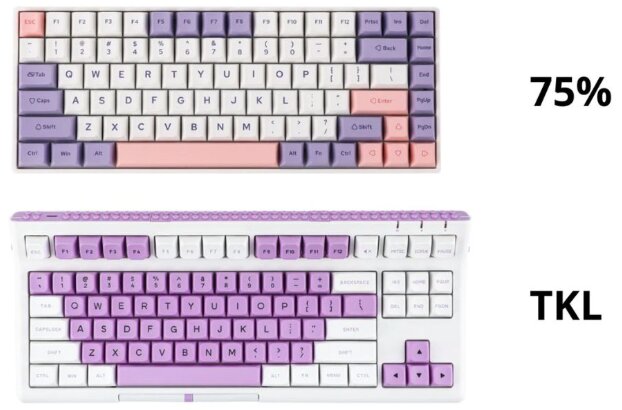
Typical TKL Layout
[F Keys]

Main Keys

Navigation Cluster

Arrow Keys
Most TKL keyboards contain approximately 87 keys.
What Is a 75% Keyboard?
A 75% keyboard takes the same basic functionality as a TKL keyboard and compresses it into a smaller footprint.
Instead of leaving gaps between key sections, manufacturers place keys much closer together.
A typical 75% keyboard includes:
- Function row
- Arrow keys
- Navigation keys
- Dedicated Delete key
The major difference is that everything is condensed.
Typical 75% Layout
[F Keys]

Main Keys + Navigation Keys Integrated

Arrow Keys
Most 75% keyboards contain between 80 and 84 keys.
The result is a significantly smaller keyboard without sacrificing many important keys.
75% vs TKL Keyboard: Key Differences
Comparison Table
| Feature | 75% Keyboard | TKL Keyboard |
|---|---|---|
| Size | Smaller | Larger |
| Number of Keys | 80-84 | 87 |
| Arrow Keys | Yes | Yes |
| Function Row | Yes | Yes |
| Navigation Cluster | Compressed | Separate |
| Desk Space | Excellent | Very Good |
| Learning Curve | Moderate | Minimal |
| Gaming Performance | Excellent | Excellent |
| Productivity | Excellent | Excellent |
| Portability | Better | Good |
Size and Desk Space
The biggest reason people choose a 75% keyboard is simple: space.
A 75% layout removes nearly all unnecessary gaps between key groups. The keyboard occupies noticeably less room on your desk compared to a TKL.
This may not sound important until you actually use one.
A smaller keyboard allows your mouse to sit closer to your body, reducing shoulder strain and creating a more comfortable posture.
For gamers who use low mouse sensitivity, the extra room can feel surprisingly valuable.
Winner: 75% Keyboard
If maximizing desk space is your goal, the 75% layout wins easily.
Typing Experience
This category is much closer than many people realize.
A TKL keyboard feels familiar because it preserves traditional spacing between key groups.
You can quickly locate:
- Arrow keys
- Delete key
- Home and End keys
- Page Up and Page Down keys
Everything sits exactly where most users expect it.
A 75% keyboard often places these keys much closer together. Some layouts even stack navigation keys vertically.
The difference isn’t huge, but it can require an adjustment period.
I switched from a TKL to a 75% keyboard several years ago, and it took about a week before the layout felt completely natural.
Winner: TKL Keyboard
The TKL layout is easier to learn and more intuitive for most users.
Gaming Performance
One of the biggest misconceptions in the keyboard world is that smaller keyboards automatically improve gaming performance.
The reality is more nuanced.
Both 75% and TKL keyboards provide:
- Fast response times
- Full gaming functionality
- Anti-ghosting support
- N-key rollover
The layout itself does not make you faster.
What can improve your gaming experience is the additional mouse space created by smaller keyboards.
This is especially useful in games like:
- Valorant
- Counter-Strike 2
- Fortnite
- Apex Legends
- Rainbow Six Siege
Since 75% keyboards are smaller, they offer slightly more room for large mouse movements.
Winner: 75% Keyboard
The advantage is small but real.
Productivity and Work
For office work, programming, writing, and general productivity, both layouts perform extremely well.
The main difference comes down to navigation keys.
On a TKL keyboard, navigation keys have dedicated positions that are easy to locate by touch.
On a 75% keyboard, those same keys often sit closer together.
People who frequently use:
- Home
- End
- Insert
- Page Up
- Page Down
may prefer the TKL layout.
Writers, programmers, and spreadsheet users often appreciate the clearer organization.
Winner: TKL Keyboard
The more spacious layout improves usability during long work sessions.
Portability
If you frequently carry your keyboard between locations, size becomes much more important.
Many enthusiasts overlook how much easier a 75% keyboard is to transport.
Even a reduction of a few inches can make a noticeable difference in:
- Backpacks
- Travel cases
- Desk setups
- LAN events
Because of its compact design, the 75% layout is generally preferred among keyboard enthusiasts who travel.
Winner: 75% Keyboard
The smaller footprint makes transportation easier.
Custom Keyboard Availability
The custom keyboard market has exploded in recent years.
Interestingly, 75% layouts have become one of the most popular categories for enthusiasts.
Many premium custom keyboards now use 75% layouts because they offer an excellent balance between functionality and compactness.
You’ll find countless options featuring:
- Gasket mounts
- Hot-swappable switches
- Aluminum cases
- Rotary knobs
- Premium acoustics
TKL keyboards still exist in the enthusiast space, but 75% layouts currently receive more attention from custom keyboard manufacturers.
Winner: 75% Keyboard
The enthusiast market strongly favors 75% layouts right now.
Ergonomics
Both layouts improve ergonomics compared to full-size keyboards.
Removing the numpad allows your mouse to sit closer to the center of your body.
This reduces shoulder abduction and can improve comfort during long sessions.
Since 75% keyboards are slightly narrower than TKL models, they offer a small ergonomic advantage.
The difference isn’t dramatic, but every inch matters when optimizing a workstation.
Winner: 75% Keyboard
The smaller footprint creates a slightly more ergonomic setup.
Which Layout Is Better for Gaming?
For most gamers, I would choose a 75% keyboard.
Reasons include:
- More mouse space
- Smaller footprint
- Better portability
- Similar functionality
- Modern enthusiast designs
The performance difference is minimal, but the extra desk space is beneficial in competitive games.
Which Layout Is Better for Typing?
For pure typing, the answer depends on personal preference.
A TKL keyboard offers:
- Better spacing
- Easier navigation
- More familiar layout
A 75% keyboard offers:
- Smaller size
- Cleaner setup
- Better ergonomics
If you spend most of your day writing or working in spreadsheets, TKL may feel more comfortable.
Who Should Buy a 75% Keyboard?
A 75% keyboard is ideal if you:
- Play competitive games
- Want maximum desk space
- Travel frequently
- Prefer compact setups
- Enjoy custom keyboards
- Want a modern layout
Popular examples include many enthusiast keyboards from Keychron, Akko, MonsGeek, Epomaker, and ASUS.
Who Should Buy a TKL Keyboard?
A TKL keyboard is ideal if you:
- Prefer traditional layouts
- Use navigation keys frequently
- Want a shorter learning curve
- Transition from a full-size keyboard
- Prioritize familiarity over compactness
Popular TKL options include many esports-focused keyboards from Logitech, Razer, SteelSeries, and Corsair.
Frequently Asked Questions
Is a 75% keyboard smaller than a TKL?
Yes. A 75% keyboard is noticeably smaller because it removes most of the empty space between key groups.
Do 75% keyboards have function keys?
Yes. Most 75% keyboards include a full F1-F12 function row.
Is a 75% keyboard good for gaming?
Absolutely. Many competitive gamers prefer 75% keyboards because they provide additional mouse space while maintaining essential keys.
Why are 75% keyboards so popular?
They offer one of the best balances between functionality and compactness. Users retain arrow keys and function keys while reducing overall size.
Is TKL better than 75%?
Not necessarily. TKL keyboards are easier to learn and feel more familiar, while 75% keyboards save more space and are often preferred by enthusiasts.
Final Verdict: 75% vs TKL Keyboard
The battle between 75% and TKL keyboards doesn’t have a universal winner.
Both layouts remove the numpad, improve ergonomics, and work exceptionally well for gaming and productivity.
That said, if I were recommending one layout to the average buyer in 2026, I would lean toward the 75% keyboard.
You get nearly all the functionality of a TKL keyboard while saving additional desk space. The compact design works better for gaming setups, modern workstations, and travel, and it’s become the preferred layout for many keyboard enthusiasts.
However, if you value familiarity and want a layout that feels instantly comfortable, a TKL keyboard remains one of the safest and most versatile choices available.
The good news is that there isn’t a wrong answer here. Both layouts represent a major upgrade over bulky full-size keyboards for most users.