

Accountants spend countless hours entering data, managing spreadsheets, reconciling accounts and working with financial software. While most people focus on monitors and processors, the keyboard is often the tool accountants interact with more than anything else throughout the workday.
The wrong keyboard can lead to slower data entry, wrist fatigue, and reduced productivity. The right keyboard, on the other hand, can make navigating Excel, QuickBooks, Xero, and other accounting software significantly more efficient.
After comparing typing comfort, numeric keypad accessibility, wireless performance, build quality, multi-device functionality, battery life, and overall productivity features, one keyboard stood out as the best choice for accounting professionals.
Our Top Recommendation: Logitech MX Keys S Combo
Why We Recommend It
The Logitech MX Keys S Combo delivers everything accountants need in a professional workspace.
It combines an outstanding full-size keyboard layout with a dedicated numeric keypad, comfortable low-profile keys, customizable shortcuts, smart backlighting, multi-device connectivity, and one of the best typing experiences available today.
Combined with the included precision mouse and palm rest, it creates a complete workstation setup ideal for long accounting sessions.
Best Keyboard for Accountants: Our Top Picks
1. Logitech MX Keys S Combo – Best Overall Keyboard for Accountants

Pros
✓ Excellent typing experience
✓ Full-size layout with dedicated numpad
✓ Smart backlighting
✓ Includes premium mouse and palm rest
✓ Multi-device support
✓ Highly customizable shortcuts
Cons
✕ Premium price
✕ Not a mechanical keyboard
Specifications
| Feature | Specification |
|---|---|
| Connectivity | Bluetooth, Logi Bolt |
| Numeric Keypad | Yes |
| Backlighting | Smart adaptive |
| Multi-Device | Up to 3 devices |
| Rechargeable | USB-C |
| Included Accessories | Mouse and palm rest |
If your workday revolves around Excel spreadsheets, financial statements, and data entry, it’s hard to find a more complete package than the Logitech MX Keys S Combo.
The first thing you’ll notice is the typing quality. Every keystroke feels stable, precise, and remarkably quiet. The low-profile keys have just enough travel to remain satisfying while minimizing finger fatigue during long accounting sessions.
The full-size layout is especially valuable for accountants. The dedicated numeric keypad makes entering financial data dramatically faster compared to compact keyboards that omit this feature.
One feature that surprised me was the intelligent backlighting system. The keyboard automatically illuminates when your hands approach and adjusts brightness based on ambient lighting conditions. For professionals who occasionally work late nights during tax season or month-end close, this becomes incredibly useful.
The included MX mouse further enhances productivity. Navigating massive spreadsheets, reports, and accounting dashboards feels smooth and efficient.
Multi-device functionality is another major advantage. You can seamlessly switch between a desktop, laptop, and tablet with the press of a button.
After spending extended periods working in spreadsheets, it’s easy to see why so many finance professionals consider this one of the best productivity keyboards available.
Bottom Line: If you want the best overall keyboard for accountants, the Logitech MX Keys S Combo is the clear winner.
2. Logitech Signature K650 – Best Keyboard for Long Accounting Sessions

Pros
✓ Integrated wrist rest
✓ Dedicated numeric keypad
✓ Deep cushioned keys
✓ Excellent comfort
✓ Long battery life
Cons
✕ Bulkier than slim keyboards
✕ Basic aesthetics
Specifications
| Feature | Specification |
|---|---|
| Connectivity | Bluetooth, Logi Bolt |
| Numeric Keypad | Yes |
| Wrist Rest | Built-in |
| Battery Life | Up to 36 months |
| Layout | Full-size |
| Compatibility | Windows, Mac, ChromeOS |
For accountants spending eight or more hours each day at their desk, comfort becomes just as important as functionality.
The Logitech Signature K650 was clearly designed with long-term ergonomics in mind.
The built-in wrist rest immediately stands out. It provides excellent support during lengthy spreadsheet sessions and helps reduce strain compared to traditional keyboards.
The deep-cushioned keys offer a softer typing feel than many competing models. While some users prefer shorter key travel, accountants who type thousands of numbers and reports daily often appreciate the extra comfort.
The dedicated numpad remains large and easy to access, making it ideal for bookkeeping, payroll processing, invoicing, and financial analysis.
Battery life is another highlight. Many users can go years without replacing the batteries, making it one of the lowest-maintenance keyboards on this list.
Bottom Line: If comfort is your top priority, the Logitech Signature K650 is one of the best keyboards available for accounting professionals.
3. Keychron K4 Version 2 – Best Mechanical Keyboard for Accountants
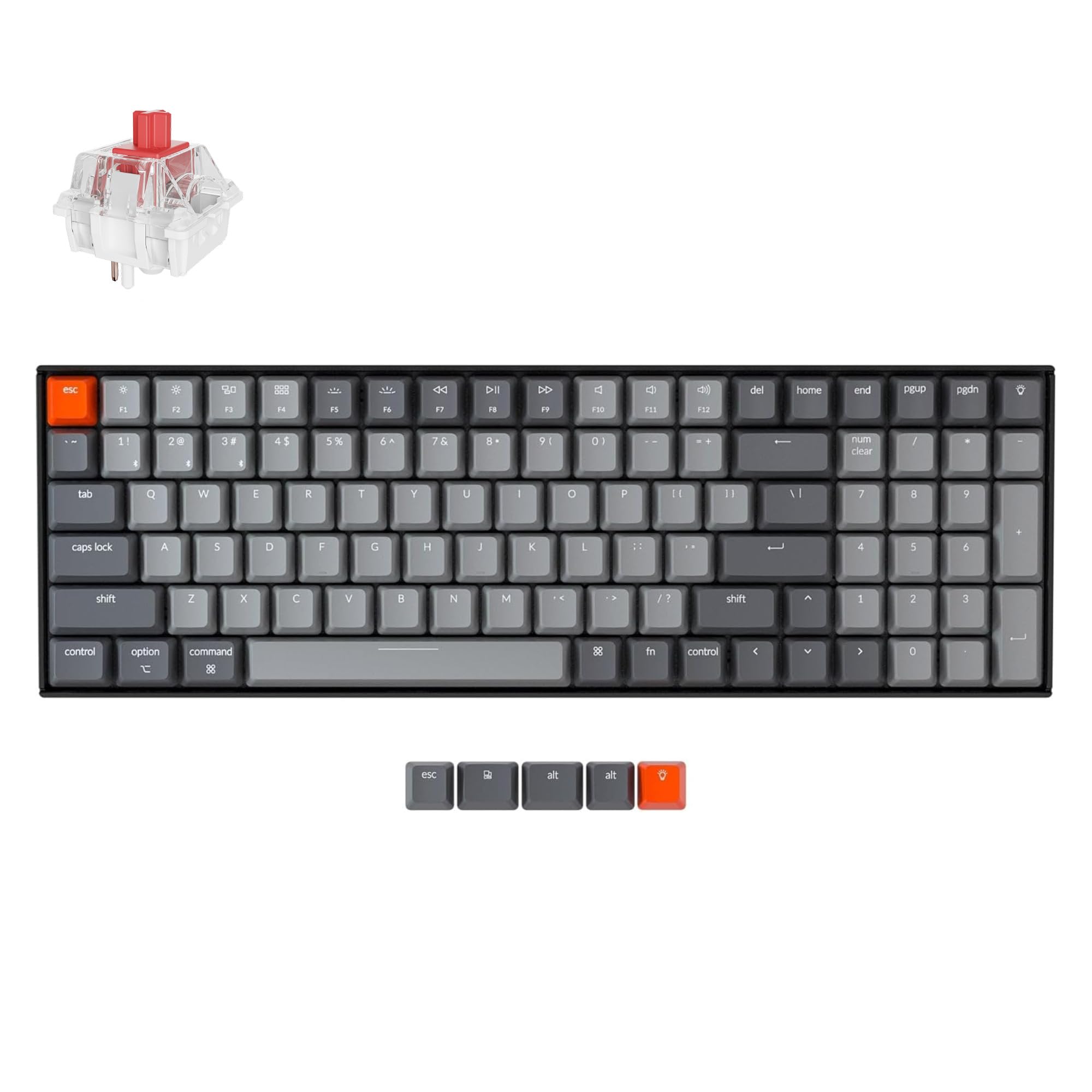
Pros
✓ Mechanical switches improve typing precision
✓ Full numpad in compact 96% layout
✓ Bluetooth and wired connectivity
✓ Excellent build quality
✓ Mac and Windows support
Cons
✕ Louder than membrane keyboards
✕ Learning curve for some users
Specifications
| Feature | Specification |
|---|---|
| Layout | 96% |
| Switches | Keychron Super Brown |
| Connectivity | Bluetooth 5.1, USB-C |
| Multi-Device | Up to 3 devices |
| N-Key Rollover | Yes |
| OS Support | Mac and Windows |
Mechanical keyboards have become increasingly popular among professionals, and the Keychron K4 V2 demonstrates why.
Unlike many compact keyboards that sacrifice the numpad, the K4 maintains a dedicated numeric keypad while reducing overall desk space.
For accountants who spend significant time entering figures, the tactile feedback from the Super Brown switches can improve typing accuracy and speed.
The keyboard also offers exceptional flexibility thanks to its wireless and wired modes. Bluetooth allows a clean workspace, while USB-C provides a stable wired connection when preferred.
Its Mac and Windows compatibility is another major advantage for professionals who work across different systems.
Bottom Line: Accountants who prefer mechanical keyboards will find the Keychron K4 V2 to be one of the strongest options available.
4. Logitech K780 Multi-Device Wireless Keyboard – Best for Multi-Device Accounting Workflows

Pros
✓ Switches between 3 devices instantly
✓ Full-size layout with numpad
✓ Integrated device cradle
✓ Reliable wireless performance
✓ Excellent productivity features
Cons
✕ Keys feel slightly softer
✕ Larger footprint
Specifications
| Feature | Specification |
|---|---|
| Connectivity | Bluetooth |
| Multi-Device | 3 devices |
| Numeric Keypad | Yes |
| Device Cradle | Yes |
| Battery Life | Up to 24 months |
| Compatibility | Windows, Mac, iOS, Android |
Many accountants now work across multiple devices throughout the day.
The Logitech K780 was built specifically for that workflow.
Its standout feature is effortless switching between computers, tablets, and smartphones. With a single button press, you can move from a desktop spreadsheet to a tablet dashboard or mobile accounting app.
The integrated device cradle keeps secondary devices positioned directly above the keyboard, reducing desk clutter.
Combined with a full numeric keypad and comfortable typing experience, it becomes an excellent solution for modern accounting professionals who frequently multitask across platforms.
Bottom Line: The Logitech K780 is the best keyboard for accountants who regularly work across multiple devices.
5. Logitech Signature Slim Solar K980 – Best Battery Life Keyboard for Accountants
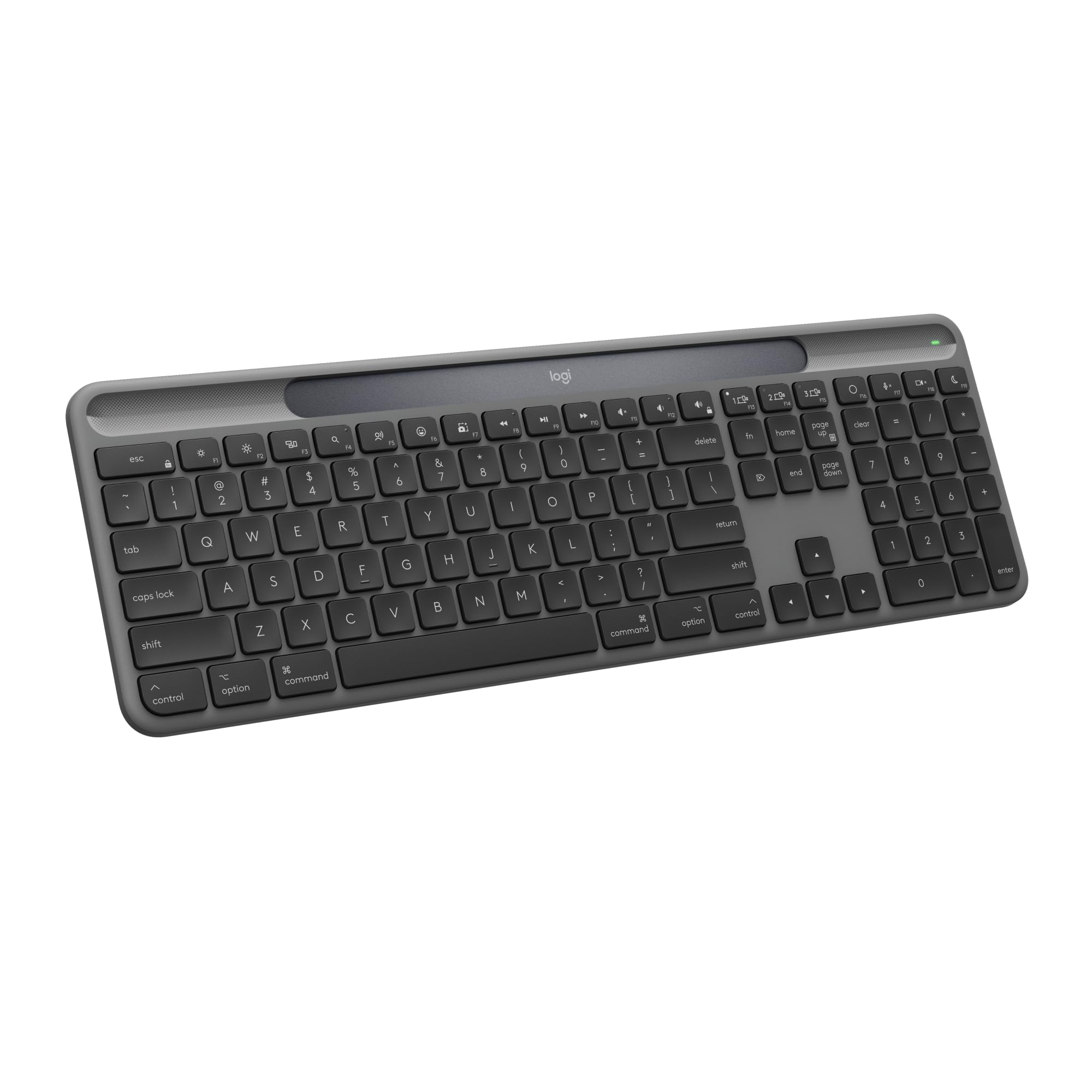
Pros
✓ Solar-powered operation
✓ Up to 10 years of battery life
✓ Full-size layout with numpad
✓ Multi-device support
✓ Slim and professional design
✓ Quiet typing experience
Cons
✕ Less key travel than mechanical keyboards
✕ No included wrist rest
Specifications
| Feature | Specification |
|---|---|
| Connectivity | Bluetooth |
| Numeric Keypad | Yes |
| Power Source | Solar and artificial light |
| Battery Life | Up to 10 years |
| Multi-Device | Yes |
| Customizable Keys | Yes |
The last thing most accountants want to think about is charging another device.
That’s exactly why the Logitech Signature Slim Solar K980 stands out.
Instead of relying solely on rechargeable batteries, it uses both solar and indoor artificial light to maintain power. For many office workers, this can translate into years of use without worrying about charging schedules.
The keyboard itself is slim, modern, and professional-looking. It fits naturally into accounting offices where clean desk setups are common.
Typing feels crisp and quiet. The low-profile keys are comfortable for long work sessions, and the dedicated numeric keypad makes spreadsheet navigation significantly more efficient.
The customizable shortcut keys are another advantage. Accountants can assign frequently used functions and applications, reducing repetitive clicks throughout the day.
What makes this keyboard particularly attractive is its virtually maintenance-free design. During busy tax seasons, month-end closes, and audit periods, one less device to manage is always appreciated.
Bottom Line: If battery life and convenience are your priorities, the Logitech Signature Slim Solar K980 is one of the most practical keyboards accountants can buy.
6. AULA F75 Pro – Best Compact Mechanical Keyboard for Accountants

Pros
✓ Excellent mechanical typing feel
✓ Triple-mode connectivity
✓ Hot-swappable switches
✓ Premium build quality
✓ Compact footprint
✓ Dedicated volume knob
Cons
✕ No numeric keypad
✕ Not ideal for heavy data entry
Specifications
| Feature | Specification |
|---|---|
| Layout | 75% |
| Connectivity | Bluetooth, 2.4GHz, USB-C |
| Switch Type | Pre-Lubed Reaper Switches |
| Hot Swappable | Yes |
| RGB Lighting | Yes |
| Volume Knob | Yes |
The AULA F75 Pro is the most unique keyboard on this list.
Unlike traditional accounting keyboards, it prioritizes typing quality and desk space over maximum functionality.
The first thing you’ll notice is the premium typing experience. The pre-lubed switches feel smooth, responsive, and surprisingly refined for the price.
Its compact 75% layout frees up valuable desk space and allows users to keep their mouse closer to their body, which some professionals find more ergonomic.
The dedicated volume knob is also a welcome productivity feature, making it easy to adjust calls, meetings, and media without interrupting workflow.
However, accountants should be aware of one major limitation: there’s no dedicated numeric keypad.
For professionals who spend hours entering financial figures into Excel, QuickBooks, Sage, or NetSuite, the missing numpad may become frustrating.
That said, accountants whose work focuses more on analysis, reporting, auditing, consulting, or management may find the superior typing experience worth the tradeoff.
Bottom Line: The AULA F75 Pro is best suited for accountants who value mechanical keyboard quality and compact design more than high-volume numerical data entry.
Product Comparison Table
| Keyboard | Numeric Keypad | Multi-Device | Wireless | Mechanical | Best For |
|---|---|---|---|---|---|
| Logitech MX Keys S Combo | Yes | Yes | Bluetooth | No | Overall productivity |
| Logitech Signature K650 | Yes | No | Bluetooth/USB | No | Comfort |
| Keychron K4 V2 | Yes | 3 Devices | Bluetooth/Wired | Yes | Mechanical typing |
| Logitech K780 | Yes | 3 Devices | Bluetooth | No | Multi-device setups |
| Logitech Signature Slim Solar K980 | Yes | Yes | Bluetooth | No | Battery life |
| AULA F75 Pro | No | Yes | Bluetooth/2.4GHz/USB | Yes | Compact desks |
Frequently Asked Questions
What is the best keyboard for accountants?
The Logitech MX Keys S Combo is our top recommendation for accountants. It combines a full-size layout, dedicated numeric keypad, comfortable low-profile keys, multi-device connectivity, and excellent build quality. These features make it particularly well-suited for Excel, QuickBooks, bookkeeping, and general accounting tasks.
Do accountants need a keyboard with a numeric keypad?
Yes, most accountants benefit significantly from a dedicated numeric keypad. Entering financial data, invoices, payroll figures, and spreadsheet information is much faster and more accurate with a numpad compared to using the number row at the top of the keyboard.
Is a mechanical keyboard good for accounting work?
Mechanical keyboards can be excellent for accounting work, especially for professionals who enjoy tactile feedback. Models like the Keychron K4 V2 provide satisfying key presses that may improve typing accuracy during long data-entry sessions. However, some accountants prefer quieter membrane keyboards for office environments.
What keyboard do accountants use for Excel?
Many accountants use full-size Logitech keyboards because of their reliability and productivity-focused features. The Logitech MX Keys S Combo, Logitech K650, and Logitech K780 are particularly popular choices for Excel users thanks to their dedicated numpads and comfortable layouts.
Is the Logitech MX Keys S Combo worth it for accountants?
Yes. While it costs more than many alternatives, the MX Keys S Combo offers exceptional typing comfort, premium construction, smart backlighting, multi-device support, and a dedicated numeric keypad. For accountants who spend hours each day at their keyboard, the investment is often worthwhile.
What is the best wireless keyboard for accountants?
The Logitech MX Keys S Combo is the best wireless keyboard for most accountants. It offers reliable Bluetooth connectivity, a full-size layout, excellent battery life, and seamless switching between multiple devices.
Are compact keyboards good for accountants?
Compact keyboards can work for accountants, but most professionals prefer layouts that include a dedicated numeric keypad. Compact models like the AULA F75 Pro save desk space, but they may slow down numerical data entry for users who frequently work with spreadsheets and financial records.
What is the best keyboard for QuickBooks users?
QuickBooks users typically benefit from keyboards that feature a full-size layout and dedicated numeric keypad. The Logitech MX Keys S Combo and Logitech K650 are particularly strong choices because they make repetitive financial data entry more comfortable and efficient.
What is the best keyboard for bookkeeping?
Bookkeepers often spend large portions of their day entering transactions and reconciling accounts. A keyboard such as the Logitech MX Keys S Combo or Keychron K4 V2 can improve both speed and accuracy thanks to their comfortable layouts and dedicated number pads.
Should accountants choose wired or wireless keyboards?
Most accountants today prefer wireless keyboards because they reduce cable clutter and create a cleaner workspace. Modern wireless keyboards offer excellent reliability and battery life, making them practical for daily office use.
What features should accountants look for in a keyboard?
The most important features include:
- Dedicated numeric keypad
- Comfortable typing experience
- Reliable wireless connectivity
- Long battery life
- Durable construction
- Multi-device support
- Ergonomic design
- Compatibility with Windows and Mac systems
These features help improve productivity while reducing fatigue during long work sessions.
How long should a good accounting keyboard last?
A high-quality keyboard should last several years of daily use. Premium models from Logitech and Keychron often remain reliable for five years or longer when properly maintained.
Why a Numeric Keypad Matters for Accounting
The numeric keypad remains one of the most important keyboard features for accounting professionals.
Compared to using the number row across the top of the keyboard, a numpad allows much faster entry of:
- Financial transactions
- Journal entries
- Payroll data
- Invoice totals
- Budget figures
- Tax information
Many experienced accountants refuse to use a keyboard without a dedicated numpad because of the productivity advantages it provides.
This is one reason why the Logitech MX Keys S Combo, Logitech K650, Logitech K780, and Keychron K4 V2 rank so highly for accounting work.
Ergonomic Considerations for Accountants
Accounting professionals often spend eight to ten hours per day at their desks.
Over time, poor ergonomics can contribute to:
- Wrist fatigue
- Hand discomfort
- Finger strain
- Shoulder tension
- Reduced productivity
When selecting a keyboard, consider:
Wrist Support
Built-in wrist rests such as the one found on the Logitech K650 can improve comfort during long work sessions.
Key Travel
Keys that require excessive force can contribute to fatigue. Most accountants benefit from moderate or low-force switches.
Keyboard Angle
Adjustable tilt settings allow users to find a more comfortable typing position.
Desk Position
The keyboard should sit at a height that allows your forearms to remain parallel to the floor.
Investing in an ergonomic keyboard can improve comfort and productivity throughout the year.
Common Keyboard Mistakes Accountants Make
Many professionals focus on price alone when purchasing a keyboard.
Unfortunately, this often leads to poor long-term results.
Here are some common mistakes to avoid.
Choosing a Keyboard Without a Numpad
Many compact keyboards look attractive but significantly slow down numerical data entry.
Ignoring Ergonomics
A keyboard used for eight hours daily should prioritize comfort.
Buying Based Solely on Gaming Features
RGB lighting and gaming-focused specifications rarely improve accounting productivity.
Overlooking Multi-Device Support
Many accountants now work across laptops, desktops, tablets, and mobile devices.
Prioritizing Cost Over Reliability
A quality keyboard can last for years and directly impacts daily productivity.
How the Right Keyboard Can Improve Accounting Productivity
Small improvements in workflow can create significant time savings over the course of a year.
A keyboard that reduces typing fatigue may help maintain focus during long work sessions. A dedicated numeric keypad can accelerate data entry. Multi-device support can eliminate interruptions caused by switching between systems.
Consider an accountant entering thousands of numerical values each week. Saving even a fraction of a second per entry can translate into hours of reclaimed productivity over time.
Similarly, ergonomic features such as wrist rests and low-profile keys may reduce discomfort during busy reporting periods.
When viewed as a long-term productivity tool rather than a simple accessory, investing in a high-quality keyboard often becomes an easy decision.
Who Should Buy Each Keyboard?
Choose the Logitech MX Keys S Combo if:
- You want the best overall experience
- You spend hours in Excel every day
- You want premium build quality
- You frequently switch between devices
Choose the Logitech Signature K650 if:
- Comfort is your top priority
- You work long hours
- You want a built-in wrist rest
- You prefer a traditional full-size layout
Choose the Keychron K4 V2 if:
- You want a mechanical keyboard
- You need a numeric keypad
- You like tactile switches
- You want wired and wireless flexibility
Choose the Logitech K780 if:
- You use multiple devices daily
- You want an integrated device stand
- You frequently move between systems
Choose the Logitech Signature Slim Solar K980 if:
- You want exceptional battery life
- You prefer low-maintenance peripherals
- You value sustainability
Choose the AULA F75 Pro if:
- You want a compact mechanical keyboard
- You have limited desk space
- You prioritize customization and RGB lighting
Final Verdict
Choosing the best keyboard for accountants ultimately comes down to balancing comfort, productivity, and workflow requirements.
After comparing all six options, the Logitech MX Keys S Combo earns our top recommendation. Its exceptional typing experience, full-size layout, dedicated numeric keypad, smart backlighting, multi-device support, and premium build quality make it the most complete solution for accounting professionals. Whether you’re working in Excel, QuickBooks, Xero, Sage, or other financial software, it delivers the performance needed for long hours of data entry and analysis.
If comfort is your top priority, the Logitech Signature K650 stands out thanks to its integrated wrist rest and cushioned keys. For accountants who prefer mechanical keyboards, the Keychron K4 Version 2 offers excellent tactile feedback while retaining a numpad in a space-saving layout.
Professionals who frequently switch between devices should take a close look at the Logitech K780, while those seeking exceptional battery life will appreciate the Logitech Signature Slim Solar K980. Meanwhile, the AULA F75 Pro provides a compact and customizable mechanical option for users with limited desk space.
At the end of the day, the best keyboard for accountants is one that helps you work faster, stay comfortable during long sessions, and reduce errors when handling financial data. Investing in a quality keyboard may seem like a small upgrade, but for professionals who spend thousands of hours each year typing numbers, reports, and spreadsheets, it can have a meaningful impact on both productivity and daily comfort.
Our Final Rankings
- Logitech MX Keys S Combo – Best Overall Keyboard for Accountants
- Logitech Signature K650 – Best for Comfort
- Keychron K4 Version 2 – Best Mechanical Keyboard
- Logitech K780 Multi-Device Keyboard – Best for Multi-Device Workflows
- Logitech Signature Slim Solar K980 – Best Battery Life
- AULA F75 Pro – Best Compact Mechanical Option
For most accounting professionals, the Logitech MX Keys S Combo offers the strongest combination of comfort, efficiency, reliability, and productivity-enhancing features, making it our top choice for the best keyboard for accountants in 2026.
![5 Best Keyboards for Mac Mini [2026]](https://bestkeyboards.blog/wp-content/uploads/2026/06/Screenshot-2026-06-06-at-6.13.30-PM.jpg)
