If you’ve spent any time looking at mechanical keyboards, you’ve probably come across the term 60% keyboard. These compact keyboards have become incredibly popular among gamers, programmers, writers, and keyboard enthusiasts because of their minimalist design and space-saving footprint.
But what exactly is a 60% keyboard, what keys does it include, and is it the right choice for you?
In this guide, we’ll cover everything you need to know about 60% keyboards, including their layout, advantages, disadvantages, common use cases, and how they compare to other keyboard sizes.
What Is a 60% Keyboard?
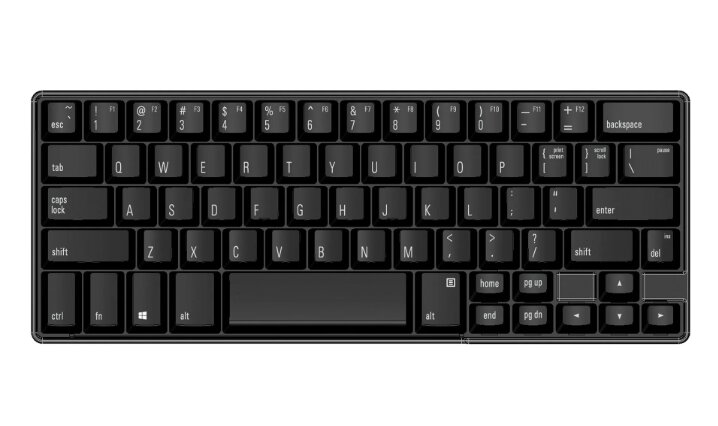
A 60% keyboard is a compact keyboard layout that contains approximately 60% of the keys found on a traditional full-size keyboard.
While a standard full-size keyboard typically includes 104 keys, a 60% keyboard usually has around 61 to 68 keys depending on the specific layout.
To achieve its compact size, a 60% keyboard removes:
- The numeric keypad
- Function row (F1–F12)
- Dedicated navigation cluster
- Arrow keys (on most models)
Instead of having dedicated keys for these functions, users access them through secondary layers using a function (Fn) key.
The result is a keyboard that takes up significantly less desk space while still retaining all essential typing keys.
What Keys Does a 60% Keyboard Have?
A typical 60% keyboard includes:
Alphanumeric Keys
- Letters A–Z
- Numbers 0–9
- Standard punctuation keys
Modifier Keys
- Shift
- Ctrl
- Alt
- Windows/Command key
- Fn key
Basic Editing Keys
- Backspace
- Enter
- Tab
- Caps Lock
- Escape
Although some dedicated keys are removed, nearly every function found on a full-size keyboard remains accessible through keyboard shortcuts and function layers.
What Keys Are Missing on a 60% Keyboard?
The most noticeable difference is what a 60% keyboard removes.
Numeric Keypad
The separate number pad on the right side is completely absent.
This makes 60% keyboards less ideal for users who frequently enter large amounts of numerical data.
Function Row
Keys F1 through F12 are removed.
Instead, users typically access them through key combinations such as:
Fn + 1 = F1
Fn + 2 = F2
And so on.
Navigation Cluster
Dedicated keys such as:
- Insert
- Delete
- Home
- End
- Page Up
- Page Down
are usually accessed through function layers.
Arrow Keys
Many traditional 60% layouts remove dedicated arrow keys entirely.
However, some modern variants include programmable shortcuts that make arrow access quick and intuitive.
Why Are 60% Keyboards So Popular?
The popularity of 60% keyboards comes from their combination of functionality, aesthetics, and ergonomics.
More Desk Space
One of the biggest advantages is the amount of desk space saved.
Removing unnecessary keys creates more room for:
- Mouse movement
- Gaming setups
- Smaller desks
- Cleaner workstations
Gamers especially appreciate the additional mouse space.
Better Ergonomics
A compact keyboard allows your mouse to sit closer to your body.
This can reduce shoulder strain because your arms remain in a more natural position.
Many users report greater comfort during long gaming or work sessions.
Portability
60% keyboards are significantly easier to carry than full-size keyboards.
They’re popular among:
- Students
- Remote workers
- Digital nomads
- Competitive gamers
Many fit easily into backpacks and laptop bags.
Minimalist Appearance
The compact design creates a clean, uncluttered desk setup.
This aesthetic appeal is one reason why 60% keyboards dominate keyboard enthusiast communities and desk setup showcases.
Advantages of a 60% Keyboard
Extremely Compact
A smaller footprint frees valuable desk space.
Lightweight
Most 60% keyboards are easy to transport.
Better Mouse Positioning
The reduced width allows a more natural arm position.
Cleaner Setup
Many users prefer the minimalist appearance.
Highly Customizable
Many mechanical 60% keyboards support:
- Hot-swappable switches
- Custom keycaps
- Programmable layouts
- RGB lighting
Great for Gaming
Many competitive gamers appreciate the additional room for large mouse movements.
Disadvantages of a 60% Keyboard
While 60% keyboards offer many benefits, they’re not perfect for everyone.
Learning Curve
Users accustomed to full-size keyboards may initially struggle with function layers.
Simple tasks may require remembering shortcuts.
No Dedicated Arrow Keys
For spreadsheet users, writers, and programmers, this can be frustrating at first.
Slower Numerical Data Entry
Without a number pad, entering large amounts of numerical data becomes less efficient.
Less Convenient for Certain Workflows
Some professions rely heavily on:
- Function keys
- Navigation keys
- Number pads
In these situations, larger layouts may be better.
Who Should Buy a 60% Keyboard?
Gamers
Many FPS gamers prefer 60% keyboards because they maximize mouse space.
Games that primarily rely on WASD controls work exceptionally well with compact layouts.
Students
Students often need a portable keyboard that can fit into a backpack alongside a laptop.
Writers
Many writers appreciate the reduced desk clutter and comfortable typing position.
Keyboard Enthusiasts
The 60% layout is one of the most popular formats for custom mechanical keyboard builds.
Remote Workers
Users with limited desk space often benefit from the compact footprint.
Who Should Avoid a 60% Keyboard?
A 60% keyboard may not be ideal if you regularly use:
- The numeric keypad
- Function keys
- Spreadsheet software
- Accounting software
- Data entry applications
In these cases, a 75%, TKL, or full-size keyboard may be more practical.
60% Keyboard vs TKL Keyboard
60% Keyboard
Pros:
- Smaller footprint
- More portable
- More mouse space
Cons:
- No dedicated arrow keys
- No function row
- Steeper learning curve
TKL Keyboard
Pros:
- Dedicated function row
- Dedicated arrow keys
- Easier transition from full-size
Cons:
- Larger footprint
- Less portable
For many users, TKL represents the middle ground between functionality and compactness.
60% Keyboard vs 65% Keyboard
This is one of the most common comparisons.
A 65% keyboard is very similar to a 60% layout but adds:
- Dedicated arrow keys
- A few navigation keys
Many users consider 65% keyboards the best balance between compactness and usability.
If arrow keys are important to you, a 65% keyboard may be worth considering.
Are 60% Keyboards Good for Gaming?
Yes.
In fact, many professional and competitive gamers use 60% keyboards.
Benefits include:
- More room for low-sensitivity mouse movements
- Easier desk positioning
- Reduced clutter
- Lightweight portability
For most modern games, missing function keys and navigation keys are not a major issue.
Are 60% Keyboards Good for Typing?
Absolutely.
Typing performance is generally identical to larger keyboards because the primary typing area remains unchanged.
Once users adapt to function layers, many find 60% keyboards just as productive as larger layouts for everyday writing.
How Long Does It Take to Adjust to a 60% Keyboard?
Most users adapt within a few days to a few weeks.
The adjustment period depends largely on:
- Previous keyboard experience
- Frequency of arrow key usage
- Dependence on function keys
- Daily workflow requirements
After becoming familiar with function layers, many users find the transition surprisingly easy.
Frequently Asked Questions
Why Is It Called a 60% Keyboard?
The name comes from the keyboard containing roughly 60% of the keys found on a standard full-size keyboard.
Can You Use a 60% Keyboard for Work?
Yes. Many programmers, writers, designers, and office workers use 60% keyboards daily.
Do 60% Keyboards Have Arrow Keys?
Most traditional 60% layouts do not include dedicated arrow keys. However, arrow functions remain available through keyboard shortcuts and layers.
Are 60% Keyboards Good for Programming?
Many programmers enjoy them because they save desk space and support highly customizable layouts. However, developers who frequently use function keys may prefer a 65%, 75%, or TKL keyboard.
Are 60% Keyboards Better Than Full-Size Keyboards?
Neither is objectively better. The right choice depends on your workflow, desk space, and personal preferences.
Final Thoughts
A 60% keyboard is one of the most compact and popular keyboard layouts available today. By removing the number pad, function row, navigation cluster, and other less frequently used keys, it creates a smaller footprint while maintaining full typing functionality through function layers.
For gamers, writers, students, remote workers, and keyboard enthusiasts, a 60% keyboard can offer a cleaner desk setup, improved ergonomics, and excellent portability. However, users who frequently rely on dedicated function keys, navigation controls, or a numeric keypad may find larger layouts more convenient.
If maximizing desk space and achieving a minimalist setup are priorities, a 60% keyboard is definitely worth considering.