

Long nails can make typing surprisingly frustrating. Keys that are too close together, switches that require too much force, or layouts with shallow spacing can lead to missed keystrokes, accidental presses, and uncomfortable typing sessions.
The good news is that some keyboards are far better suited for acrylic nails, gel nails, press-ons, and naturally long nails than others. Features like rounded keycaps, larger spacing, responsive switches, low-force actuation, and ergonomic layouts can make a huge difference in day-to-day comfort.
After comparing typing feel, keycap design, switch responsiveness, comfort for long nails, connectivity options, and overall value, one keyboard stood above the rest.
Our Top Recommendation: AULA F99 Wireless Mechanical Keyboard
Why we recommend it:
The AULA F99 Wireless Mechanical Keyboard delivers the best overall typing experience for users with long nails. Its pre-lubed linear switches require minimal force, the gasket-mounted structure creates a softer typing feel and the spacious key layout reduces accidental presses.
Combined with tri-mode wireless connectivity, hot-swappable switches, and premium build quality, it offers the ideal combination of comfort and performance.
Best Keyboard for Long Nails: Our Top Picks
1) AULA F99 Wireless Mechanical Keyboard – Best Overall Keyboard for Long Nails

Pros
✓ Soft gasket-mounted typing experience
✓ Pre-lubed linear switches
✓ Spacious key layout
✓ Tri-mode connectivity
✓ Hot-swappable switches
✓ Excellent build quality
Cons
✕ Higher price than basic keyboards
✕ Learning curve for first-time mechanical keyboard users
Specifications
| Feature | Specification |
|---|---|
| Connectivity | Bluetooth, 2.4GHz, USB-C |
| Switch Type | Pre-lubed Linear |
| Layout | 99-Key |
| Hot Swappable | Yes |
| RGB Lighting | Yes |
| Battery | Rechargeable |
When it comes to typing with long nails, switch feel matters more than most people realize.
The AULA F99 immediately stands out because of its smooth linear switches. Unlike tactile switches that require extra force and create noticeable bumps, these switches allow your fingers—or nails—to glide effortlessly across the keyboard.
The gasket-mounted design is another major advantage. Instead of producing harsh impacts during typing, the keyboard feels cushioned and softer. This reduces fatigue during long work sessions and makes accidental nail impacts less jarring.
Spacing between keys feels comfortable without being oversized. Users with acrylic nails or longer natural nails often struggle with cramped layouts, but the F99 provides enough room for precise typing.
Its wireless flexibility also makes it ideal for modern desk setups. Whether you’re connecting to a laptop, desktop, tablet, or gaming setup, switching between devices is quick and simple.
Bottom Line: The AULA F99 offers the best overall combination of comfort, responsiveness, and typing accuracy for people with long nails.
2) KOOTOP Cute Wireless Keyboard and Mouse – Best Retro Keyboard for Long Nails

Pros
✓ Round keycaps are easy to target
✓ Attractive retro design
✓ Includes matching mouse
✓ Wireless convenience
✓ Comfortable for casual typing
Cons
✕ Not ideal for heavy typists
✕ Limited advanced features
Specifications
| Feature | Specification |
|---|---|
| Connectivity | 2.4GHz Wireless |
| Key Style | Retro Round Keycaps |
| Mouse Included | Yes |
| Layout | Full Size |
| Compatibility | Windows, Mac |
| Design | Vintage Typewriter Inspired |
The KOOTOP Cute Wireless Keyboard has become popular among users with long nails for one simple reason: the round keycaps.
Traditional square keys can sometimes make it difficult to accurately position longer nails during fast typing. The rounded keycaps provide a larger visual target and help guide finger placement more naturally.
The keyboard also has a playful aesthetic that stands out from typical office keyboards. The retro-inspired design feels stylish without sacrificing usability.
Typing requires very little effort, making it suitable for office work, emails, browsing, and everyday productivity tasks.
While power users may prefer mechanical switches, casual users will appreciate the comfortable and forgiving typing experience.
Bottom Line: One of the most attractive and beginner-friendly keyboards for users with acrylic or long natural nails.
3) RedThunder K95 Wireless Mechanical Keyboard – Best Premium Mechanical Option

Pros
✓ Premium mechanical switches
✓ TFT display and control knob
✓ Gasket-mounted design
✓ Tri-mode connectivity
✓ Hot-swappable switches
✓ Excellent typing feel
Cons
✕ Premium price
✕ Larger footprint
Specifications
| Feature | Specification |
|---|---|
| Connectivity | Bluetooth, 2.4GHz, USB-C |
| Display | TFT Screen |
| Switches | Linear Pink Switches |
| Hot Swappable | Yes |
| RGB | Yes |
| Structure | Gasket Mounted |
The RedThunder K95 is designed for users who want both performance and style.
The pre-lubed pink switches provide an exceptionally smooth keypress that works surprisingly well for long nails. There’s minimal resistance, allowing users to type comfortably without forcing their fingertips into awkward angles.
Its gasket-mounted construction creates a softer typing experience compared to traditional gaming keyboards.
The integrated TFT display and programmable knob add extra functionality that power users will appreciate.
For content creators, gamers, and professionals who spend hours typing each day, the K95 delivers a premium experience that feels luxurious from the moment you start typing.
Bottom Line: If you’re willing to invest in a premium keyboard, the RedThunder K95 is one of the best options available.
4) Wired Computer Keyboard Purple Retro Edition – Best Budget Retro Keyboard
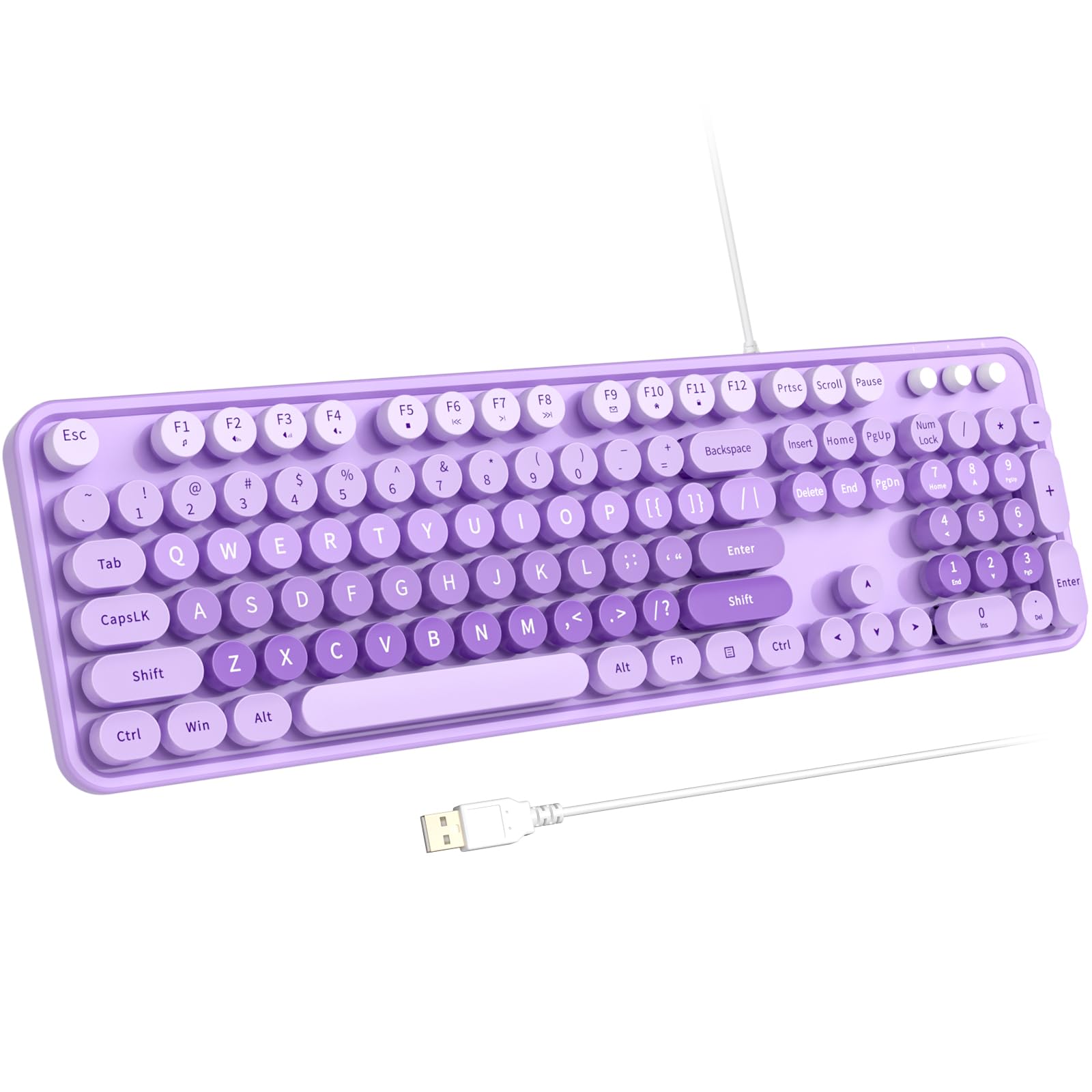
Pros
✓ Affordable price
✓ Large round keycaps
✓ Full-size layout
✓ Plug-and-play setup
✓ Fun retro appearance
Cons
✕ Wired connection only
✕ Less durable than premium options
Specifications
| Feature | Specification |
|---|---|
| Connection | USB Wired |
| Layout | Full Size |
| Keycaps | Round Retro |
| Color | Purple |
| Compatibility | Windows, PC, Laptop |
| Numeric Keypad | Yes |
This colorful retro keyboard proves you don’t need to spend a fortune to get a comfortable typing experience for long nails.
The large round keycaps make targeting individual keys easier than many modern chiclet-style keyboards.
Because it uses a full-size layout, there is plenty of spacing throughout the keyboard. Users who struggle with accidental presses on compact keyboards may find this design much easier to use.
The purple aesthetic also makes it a popular choice for home offices, student desks, and creative workspaces.
Bottom Line: A budget-friendly keyboard that remains surprisingly comfortable for users with longer nails.
5) Arteck 2.4G Wireless Keyboard – Best Ultra-Slim Keyboard for Long Nails

Pros
✓ Ultra-slim design
✓ Stainless steel construction
✓ Full-size layout
✓ Numeric keypad included
✓ Long battery life
Cons
✕ Less tactile feedback
✕ Not ideal for gaming
Specifications
| Feature | Specification |
|---|---|
| Connection | 2.4GHz Wireless |
| Layout | Full Size |
| Material | Stainless Steel |
| Numeric Keypad | Yes |
| Battery | Rechargeable |
| Design | Ultra Slim |
Some people with long nails actually prefer low-profile keyboards.
The Arteck Ultra Slim keyboard uses shallow scissor-style keys that require very little movement to actuate. This allows users to type using the pads of their fingers rather than relying on nail contact.
Its stainless steel construction feels surprisingly premium considering the affordable price point.
The full-size layout and integrated numeric keypad make it suitable for office environments, spreadsheets, and administrative work.
Battery life is another strong point. Many users can go weeks or months between charges.
Bottom Line: The best low-profile keyboard for users who prefer slim laptop-style typing.
Product Comparison Table
| Keyboard | Type | Connection | Key Style | Best For |
|---|---|---|---|---|
| AULA F99 | Mechanical | BT/2.4G/USB-C | Linear Switches | Overall comfort |
| KOOTOP Cute Wireless | Membrane | 2.4GHz | Round Retro Keys | Casual users |
| RedThunder K95 | Mechanical | BT/2.4G/USB-C | Linear Mechanical | Enthusiasts |
| Wired Purple Retro | Membrane | Wired USB | Round Typewriter Keys | Budget shoppers |
| Arteck Ultra Slim | Scissor Style | 2.4GHz | Low Profile | Office work |
How to Choose the Best Keyboard for Long Nails
Not every keyboard is comfortable for people with long nails.
Here are the features that matter most.
Keycap Shape
Round keycaps often provide better accuracy because they create larger visual targets and more natural finger positioning.
Switch Type
Linear switches generally work best because they require less force and create smoother keystrokes.
Key Spacing
Crowded layouts can lead to accidental presses. Slightly larger spacing improves accuracy.
Low Actuation Force
Keys that activate with minimal pressure reduce strain and make typing easier.
Keyboard Height
Some users prefer low-profile keyboards while others find elevated mechanical keyboards more comfortable. Personal preference plays a significant role.
Full Size vs Compact
Full-size keyboards usually provide more space between key clusters, which can help users with longer nails type more accurately.
Mechanical vs Membrane Keyboards for Long Nails
Mechanical Keyboards
Advantages:
- Smoother switches
- Better feedback
- Greater durability
- More customization
Disadvantages:
- Higher cost
- Larger size
Membrane Keyboards
Advantages:
- Affordable
- Quiet operation
- Lightweight
Disadvantages:
- Less precise feel
- Shorter lifespan
For most users with acrylic nails, gel nails, or long natural nails, mechanical keyboards with smooth linear switches tend to provide the most comfortable experience.
Frequently Asked Questions
Are mechanical keyboards better for long nails?
In many cases, yes. Linear mechanical switches provide smoother key presses and require less force, making them easier to use with longer nails.
What keycap style is best for long nails?
Round keycaps and sculpted keycaps are often easier to target accurately than flat, tightly packed keys.
Are low-profile keyboards good for acrylic nails?
Yes. Some users find low-profile keyboards easier because the shorter key travel reduces awkward finger positioning.
Do long nails affect typing speed?
Initially, they can. However, most users adapt quickly when using a keyboard with comfortable spacing and responsive switches.
What is the best keyboard for acrylic nails?
The AULA F99 Wireless Mechanical Keyboard is our top recommendation due to its smooth switches, comfortable layout, and premium typing experience.
Final Verdict
Finding the best keyboard for long nails can dramatically improve comfort, accuracy, and productivity.
After comparing all five options, the AULA F99 Wireless Mechanical Keyboard earns our top recommendation. Its smooth linear switches, cushioned gasket-mounted design, spacious layout, and wireless flexibility make it the most comfortable keyboard for users with long nails.
If you prefer a stylish retro aesthetic, the KOOTOP Cute Wireless Keyboard and Mouse is an excellent choice. For premium enthusiasts, the RedThunder K95 delivers one of the most luxurious typing experiences available.
Ultimately, the right keyboard can eliminate many of the frustrations commonly associated with typing with long nails and make everyday work significantly more enjoyable.
![5 Best Keyboards for Mac Mini [2026]](https://bestkeyboards.blog/wp-content/uploads/2026/06/Screenshot-2026-06-06-at-6.13.30-PM.jpg)
