

If you’re writing code for eight hours a day, debugging complex applications, or building your next side project, the type of keyboard you use can significantly impact your comfort, productivity, and overall coding experience.
Programmers spend thousands of hours typing every year. A poor keyboard can lead to fatigue, missed keystrokes, and an unpleasant workflow. On the other hand, a well-designed keyboard can improve typing accuracy, reduce strain, and make long coding sessions far more enjoyable.
After comparing typing comfort, switch quality, build construction, connectivity, customization features, and overall value, one keyboard stood above the competition.
Our Top Recommendation: SOLAKAKA KI99 Pro Wireless Mechanical Keyboard
Why We Recommend It
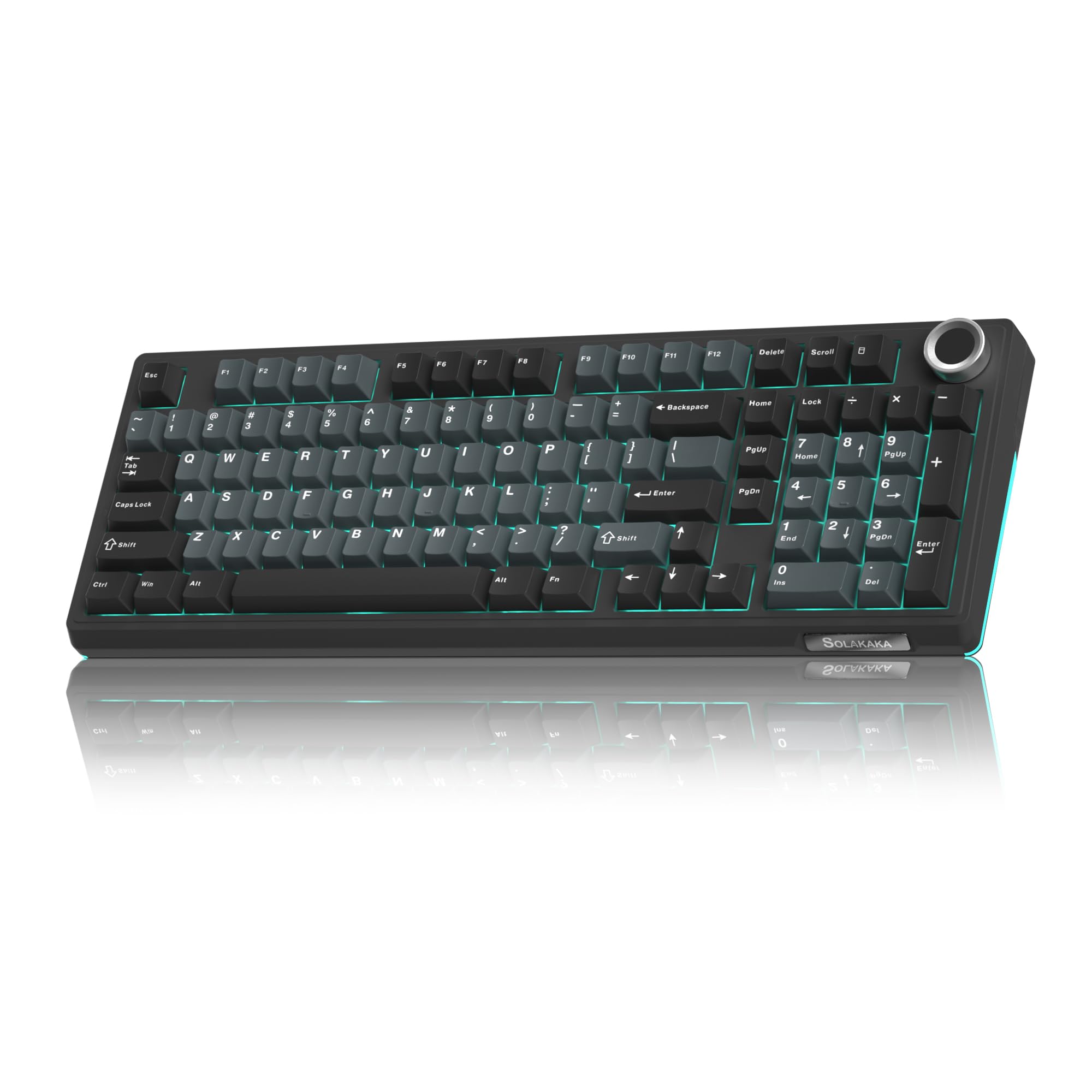
The SOLAKAKA KI99 Pro combines nearly everything programmers want in a keyboard. It features quiet switches that are ideal for long coding sessions, hot-swappable sockets for customization, gasket-mounted construction for a softer typing feel, tri-mode wireless connectivity, excellent battery life and a compact 98% layout that preserves productivity without consuming excessive desk space.
It delivers premium mechanical keyboard features at a price that is often far more attractive than many enthusiast alternatives.
Best Keyboards for Programming: Our Top Picks
1) SOLAKAKA KI99 Pro Wireless Mechanical Keyboard – Best Overall Keyboard for Programming
Pros
✓ Quiet switches ideal for coding
✓ Hot-swappable design
✓ Comfortable gasket-mounted construction
✓ Wireless and wired connectivity
✓ Excellent typing experience
✓ Premium features for the price
Cons
✕ Software could be improved
✕ RGB customization isn’t as advanced as premium competitors
Specifications
| Feature | Specification |
|---|---|
| Connectivity | Bluetooth, 2.4GHz, USB-C |
| Layout | 98% |
| Switch Type | Silent Mechanical |
| Hot Swappable | Yes |
| Backlighting | RGB |
| Mount Style | Gasket Mounted |
The SOLAKAKA KI99 Pro feels like it was designed specifically for programmers.
The first thing you’ll notice is how quiet the keyboard is compared to many traditional mechanical keyboards. The silent switches provide satisfying tactile feedback without creating distracting noise during long coding sessions.
The gasket-mounted design makes a surprisingly large difference. Every keystroke feels cushioned and refined, helping reduce finger fatigue during extended periods of programming.
Its 98% layout strikes an excellent balance between productivity and desk space. You still get a number pad and essential navigation keys while keeping the overall footprint smaller than a traditional full-size keyboard.
One of the standout features is hot-swappability. If your preferences change later, you can easily install different switches without soldering.
For developers who spend all day coding, this keyboard delivers an outstanding combination of comfort, versatility, and value.
Bottom Line: The SOLAKAKA KI99 Pro is the best keyboard for programming overall thanks to its exceptional typing experience, quiet operation, and feature-rich design.
2) Logitech MX Keys S – Best Productivity Keyboard for Programmers

Pros
✓ Extremely comfortable low-profile typing
✓ Outstanding battery life
✓ Smart backlighting
✓ Excellent multi-device support
✓ Quiet operation
Cons
✕ Not mechanical
✕ Limited customization
Specifications
| Feature | Specification |
|---|---|
| Connectivity | Bluetooth, Logi Bolt |
| Layout | Full Size |
| Battery | USB-C Rechargeable |
| Backlighting | Smart Adaptive |
| Multi-Device | Up to 3 Devices |
| Programmable Keys | Yes |
The Logitech MX Keys S has become one of the most popular keyboards among software developers, and it’s easy to understand why.
Unlike mechanical keyboards that prioritize switch feel, the MX Keys S focuses on efficiency and comfort. The low-profile keys feature a slight dish shape that helps guide your fingers naturally to the center of each key.
Typing feels incredibly smooth and precise.
Its intelligent backlighting automatically activates when your hands approach the keyboard and adjusts brightness based on ambient lighting conditions.
For programmers who frequently switch between multiple devices, the Easy-Switch functionality is particularly useful. You can move between a desktop, laptop, and tablet with a single button press.
Bottom Line: If you prefer a quieter, laptop-style typing experience, the Logitech MX Keys S is one of the best programming keyboards available.
3) ASUS ROG Strix Scope II 96 Wireless – Best Premium Mechanical Keyboard

Pros
✓ Premium construction
✓ Hot-swappable switches
✓ Excellent wireless performance
✓ Durable PBT keycaps
✓ Highly customizable
Cons
✕ Expensive
✕ More gaming-focused software
Specifications
| Feature | Specification |
|---|---|
| Connectivity | Bluetooth, 2.4GHz, USB |
| Layout | 96% |
| Switches | ROG NX Snow Linear |
| Keycaps | PBT |
| Hot Swappable | Yes |
| RGB | Per-Key |
The ASUS ROG Strix Scope II 96 Wireless delivers a premium typing experience that many programmers will appreciate.
Although marketed as a gaming keyboard, its strengths translate extremely well to software development.
The ROG NX Snow switches feel smooth, consistent, and highly responsive. Combined with factory lubrication and excellent stabilizers, the keyboard offers a polished typing experience right out of the box.
The PBT keycaps are another highlight. They resist shine and wear significantly better than standard ABS keycaps, making them ideal for programmers who spend thousands of hours typing.
Bottom Line: Developers seeking a premium enthusiast-level mechanical keyboard should strongly consider the ASUS ROG Strix Scope II 96 Wireless.
4) AULA F99 Wireless Mechanical Keyboard – Best Value Mechanical Keyboard

Pros
✓ Excellent value
✓ Hot-swappable switches
✓ Tri-mode connectivity
✓ Attractive RGB lighting
✓ Comfortable typing feel
Cons
✕ Software is basic
✕ Stabilizers aren’t as refined as premium models
Specifications
| Feature | Specification |
|---|---|
| Connectivity | Bluetooth, 2.4GHz, USB-C |
| Layout | 96% |
| Switches | Pre-Lubed Linear |
| Hot Swappable | Yes |
| RGB | Yes |
| Battery | Rechargeable |
The AULA F99 proves you don’t need to spend premium money to get an excellent mechanical keyboard.
Its pre-lubed linear switches provide smooth keystrokes that many programmers enjoy, especially when writing code for extended periods.
The tri-mode connectivity offers impressive flexibility, allowing developers to switch between devices effortlessly.
What makes the F99 especially appealing is the value proposition. Features like hot-swappable switches, wireless connectivity, RGB lighting, and a compact layout are typically found on much more expensive keyboards.
Bottom Line: The AULA F99 is one of the best budget-friendly mechanical keyboards for programming.
5) SteelSeries Apex 3 RGB – Best Budget Programming Keyboard

Pros
✓ Affordable
✓ Water resistant
✓ Quiet switches
✓ Comfortable wrist rest included
✓ Full-size layout
Cons
✕ Not mechanical
✕ Limited customization
Specifications
| Feature | Specification |
|---|---|
| Connectivity | Wired |
| Layout | Full Size |
| Switch Type | Whisper Quiet |
| RGB Zones | 10 |
| Water Resistance | IP32 |
| Wrist Rest | Magnetic |
Not every programmer wants a mechanical keyboard.
The SteelSeries Apex 3 RGB offers a quieter membrane-based typing experience while maintaining many features that improve comfort during long coding sessions.
The included magnetic wrist rest deserves special attention. It provides excellent support and helps reduce strain during extended periods of use.
Its IP32 water resistance also adds peace of mind for anyone who regularly keeps coffee or other drinks near their workstation.
Bottom Line: For programmers on a strict budget, the SteelSeries Apex 3 RGB offers excellent comfort and reliability.
Product Comparison Table
| Keyboard | Switch Type | Wireless | Hot Swappable | Layout | Backlighting | Best For |
|---|---|---|---|---|---|---|
| SOLAKAKA KI99 Pro | Silent Mechanical | Yes | Yes | 98% | RGB | Overall programming |
| Logitech MX Keys S | Scissor Switch | Yes | No | Full Size | Smart Backlight | Productivity |
| ASUS ROG Strix Scope II 96 | Mechanical | Yes | Yes | 96% | RGB | Premium enthusiasts |
| AULA F99 | Mechanical Linear | Yes | Yes | 96% | RGB | Value seekers |
| SteelSeries Apex 3 | Membrane | No | No | Full Size | 10-Zone RGB | Budget buyers |
What Makes a Great Programming Keyboard?
Not all keyboards are equally suited for software development.
Typing Comfort
Since programmers spend countless hours typing, comfort should be a top priority. High-quality switches, stable keycaps, and ergonomic layouts can dramatically improve the coding experience.
Layout Efficiency
Many developers prefer 96% or 98% layouts because they retain essential keys while saving valuable desk space.
Build Quality
A durable keyboard will remain comfortable and reliable for years. Features like PBT keycaps, aluminum frames, and gasket-mounted construction contribute to longevity.
Connectivity
Wireless keyboards help create cleaner workspaces, while multi-device support can improve productivity for developers working across multiple systems.
Noise Levels
Programmers working in offices or shared environments often benefit from quieter switches that minimize distractions.
Mechanical vs Membrane Keyboards for Programming
Mechanical Keyboards
Advantages:
- Better typing feel
- Greater durability
- Faster switch response
- Customization options
- More satisfying typing experience
Disadvantages:
- Usually more expensive
- Can be louder
Membrane Keyboards
Advantages:
- Lower cost
- Quieter operation
- Lightweight design
Disadvantages:
- Less tactile feedback
- Shorter lifespan
- Less customization
For most developers, a quality mechanical keyboard offers the superior long-term experience.
Frequently Asked Questions
What is the best keyboard for programming?
The SOLAKAKA KI99 Pro is our top recommendation because it combines quiet switches, wireless flexibility, hot-swappable customization, and excellent typing comfort.
Are mechanical keyboards better for coding?
Many programmers prefer mechanical keyboards because they provide better feedback, durability, and typing accuracy during long coding sessions.
Do programmers need RGB lighting?
No, but adjustable backlighting can improve visibility when working in low-light environments.
Is wireless latency a problem for programming?
Not at all. Modern wireless keyboards offer latency levels that are more than sufficient for software development.
What keyboard size is best for programmers?
Most developers prefer full-size, 96%, or 98% layouts because they preserve productivity keys while optimizing desk space.
Final Verdict
Choosing the best keyboard for programming depends on your preferences, budget, and typing style.
After evaluating all five options, the SOLAKAKA KI99 Pro Wireless Mechanical Keyboard stands out as the best overall choice. Its quiet switches, gasket-mounted construction, hot-swappable design, and versatile wireless connectivity create an exceptional typing experience that is perfectly suited for software development.
If you prefer a low-profile productivity-focused keyboard, the Logitech MX Keys S is an outstanding alternative.
For enthusiasts willing to invest in premium hardware, the ASUS ROG Strix Scope II 96 Wireless delivers one of the most refined mechanical typing experiences available today.
No matter which keyboard you choose, investing in a high-quality keyboard can make coding more comfortable, efficient, and enjoyable for years to come.
![5 Best Keyboards for Mac Mini [2026]](https://bestkeyboards.blog/wp-content/uploads/2026/06/Screenshot-2026-06-06-at-6.13.30-PM.jpg)
