

Typing should not hurt.
Yet millions of people spend hours every day working, gaming, studying, or browsing on keyboards that place unnecessary strain on their wrists, forearms, and hands. Over time, poor keyboard ergonomics can contribute to discomfort, repetitive stress injuries, carpal tunnel symptoms, tendon irritation, and general wrist fatigue.
While proper posture, desk height, and regular breaks all matter, one of the biggest improvements many people can make is switching to an ergonomic keyboard designed specifically to reduce wrist strain.
Unlike traditional flat keyboards, ergonomic keyboards often use split layouts, curved key arrangements, tenting angles, cushioned palm rests, and more natural hand positioning to minimize awkward wrist movement.
After evaluating ergonomics, typing comfort, wrist support, build quality, wireless performance, adjustability, learning curve, and overall value, one keyboard stood out as the best choice for people dealing with wrist pain.
Our Top Recommendation: Kinesis Advantage2
Why We Recommend It
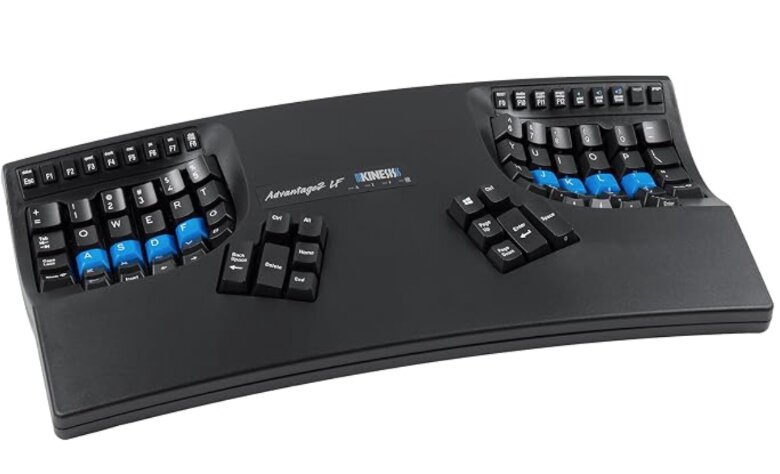
The Kinesis Advantage2 is one of the most ergonomically advanced keyboards available today.
Unlike conventional keyboards that force your hands inward, the Advantage2 uses deeply contoured key wells that position your fingers in a more natural posture. The separated thumb clusters reduce overuse of weaker fingers, while the sculpted layout minimizes wrist extension and ulnar deviation.
For users experiencing chronic wrist discomfort, repetitive strain symptoms, or long-term typing fatigue, few keyboards offer the same level of ergonomic refinement.
While there is a learning curve, many users consider it one of the most effective long-term investments for typing comfort.
Best Keyboard for Wrist Pain: Our Top Picks
1. Kinesis Advantage2 – Best Overall Keyboard for Wrist Pain

Pros
✓ Deep contoured ergonomic design
✓ Natural hand positioning
✓ Dedicated thumb clusters reduce finger strain
✓ Cherry MX Brown mechanical switches
✓ Excellent for long-term comfort
✓ Programmable keys and layouts
Cons
✕ Significant learning curve
✕ Premium price
Specifications
| Feature | Specification |
|---|---|
| Layout | Contoured ergonomic |
| Switches | Cherry MX Brown |
| Connectivity | Wired USB |
| Palm Support | Integrated |
| Programmable | Yes |
| Compatibility | Windows, Mac, Linux |
The Kinesis Advantage2 was built with one goal: reducing strain during long typing sessions.
Unlike most ergonomic keyboards that simply split the layout into two halves, the Advantage2 completely rethinks keyboard design. The concave key wells position your fingers closer to their natural resting locations, reducing the amount of movement required throughout the day.
The thumb clusters are another major advantage. Traditional keyboards overload the pinky fingers with responsibilities such as Enter, Backspace, and modifier keys. The Advantage2 transfers many of these functions to the stronger thumbs.
For people dealing with wrist pain, tendon discomfort, or repetitive stress symptoms, this design can dramatically reduce strain over time.
The Cherry MX Brown switches also provide tactile feedback without excessive force, making extended typing sessions feel more comfortable.
Bottom Line
If reducing wrist pain is your primary goal, the Kinesis Advantage2 is the best ergonomic keyboard currently available.
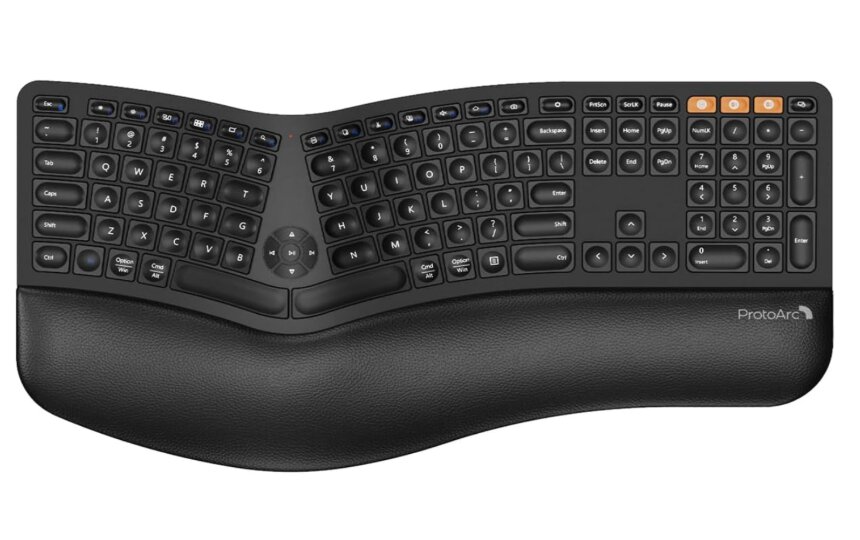
2. ProtoArc EKM01 Plus – Best Value Ergonomic Keyboard for Wrist Pain

Pros
✓ Split ergonomic layout
✓ Large integrated wrist rests
✓ Includes matching ergonomic mouse
✓ Multi-device support
✓ Rechargeable battery
✓ Excellent value
Cons
✕ Not as refined as premium models
✕ Keys feel slightly softer
Specifications
| Feature | Specification |
|---|---|
| Connectivity | Bluetooth, 2.4GHz |
| Layout | Split ergonomic |
| Wrist Rest | Integrated |
| Multi-Device | Yes |
| Battery | Rechargeable |
| Included Mouse | Yes |
The ProtoArc EKM01 Plus delivers many of the ergonomic benefits found in premium keyboards at a far more affordable price.
The split layout encourages a more natural shoulder and wrist position while the large cushioned wrist rests help support your hands throughout the day.
One of its biggest advantages is value. You receive both an ergonomic keyboard and matching mouse, creating a complete workstation designed to reduce strain.
Multi-device connectivity allows users to switch between computers, tablets, and laptops with minimal effort.
For office workers seeking wrist relief without spending premium prices, this is one of the strongest options available.
Bottom Line
The ProtoArc EKM01 Plus offers outstanding ergonomic value and earns our runner-up position.
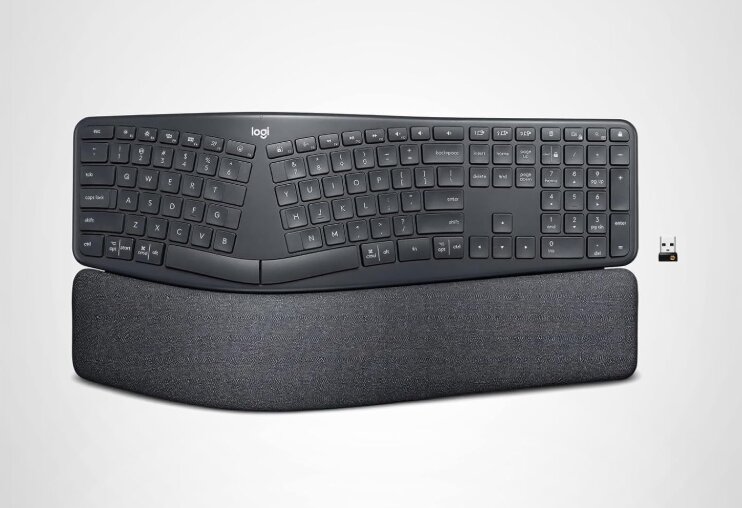
3. Logitech Ergo K860 – Best Premium Ergonomic Keyboard

Pros
✓ Scientifically designed split layout
✓ Outstanding wrist support
✓ Curved ergonomic keyframe
✓ Excellent typing quality
✓ Bluetooth and USB connectivity
✓ Premium build quality
Cons
✕ Expensive
✕ Large desk footprint
Specifications
| Feature | Specification |
|---|---|
| Connectivity | Bluetooth, USB Receiver |
| Layout | Split curved ergonomic |
| Wrist Rest | Memory foam |
| Battery Life | Up to 2 years |
| Multi-Device | Yes |
| Compatibility | Windows and Mac |
The Logitech Ergo K860 has become one of the most popular ergonomic keyboards for good reason.
Its curved split layout naturally aligns the forearms while the gently sloped design reduces wrist extension. The large memory-foam wrist rest provides exceptional support throughout the day.
Typing feels familiar compared to traditional keyboards, making the transition significantly easier than with more specialized ergonomic designs.
Many users appreciate that the K860 delivers meaningful ergonomic improvements without requiring weeks of adaptation.
Bottom Line
If you want premium ergonomics with a relatively easy learning curve, the Logitech Ergo K860 is an excellent choice.
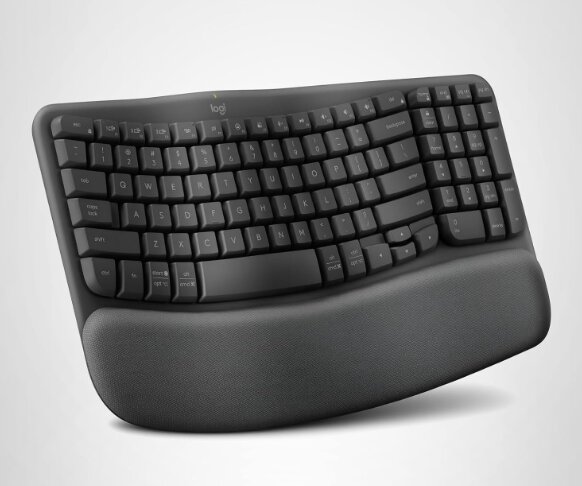
4. Logitech Wave Keys – Best Keyboard for Mild Wrist Pain

Pros
✓ Comfortable wave-shaped layout
✓ Excellent cushioned palm rest
✓ Easy adjustment period
✓ Quiet typing experience
✓ Multi-device support
Cons
✕ Less ergonomic than split keyboards
✕ Not ideal for severe wrist issues
Specifications
| Feature | Specification |
|---|---|
| Connectivity | Bluetooth, Logi Bolt |
| Layout | Wave ergonomic |
| Palm Rest | Integrated |
| Multi-Device | Yes |
| Battery Life | Up to 3 years |
| Compatibility | Windows and Mac |
The Logitech Wave Keys serves as an excellent introduction to ergonomic keyboards.
Its wave-shaped key layout encourages more natural wrist positioning while maintaining a familiar typing experience. The integrated palm rest offers substantial comfort improvements compared to standard office keyboards.
For users experiencing occasional wrist discomfort rather than severe pain, the Wave Keys provides an excellent balance between comfort and familiarity.
Bottom Line
The Logitech Wave Keys is one of the best beginner-friendly ergonomic keyboards available.
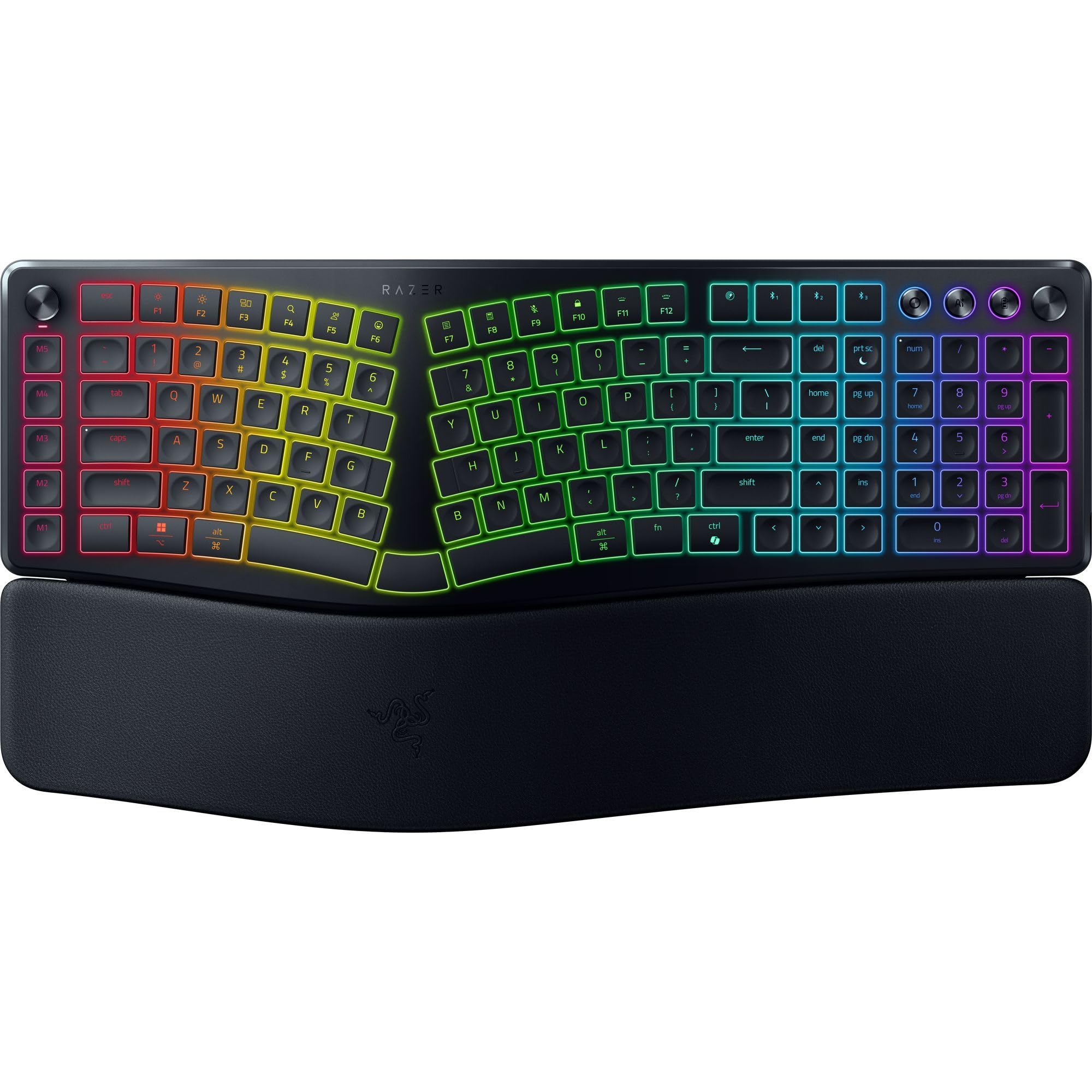
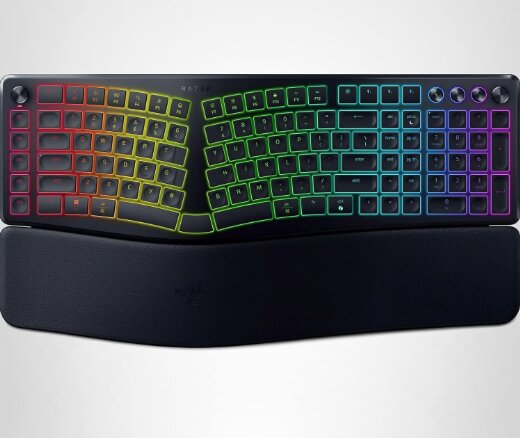
5. Razer Pro Type Ergo – Best Ergonomic Mechanical Keyboard
Pros
✓ Split ergonomic design
✓ Mechanical switches
✓ Premium wrist rest
✓ Multi-device support
✓ Adjustable tilt
✓ Professional appearance
Cons
✕ Expensive
✕ Larger footprint
Specifications
| Feature | Specification |
|---|---|
| Switches | Mechanical |
| Connectivity | Bluetooth, 2.4GHz, USB-C |
| Wrist Rest | Magnetic |
| Multi-Device | Yes |
| RGB | White Backlighting |
| Compatibility | Windows and Mac |
Many ergonomic keyboards sacrifice typing feel in favor of comfort.
The Razer Pro Type Ergo manages to deliver both.
Its ergonomic split design reduces wrist strain while the mechanical switches provide precise and satisfying feedback. The magnetic wrist rest adds another layer of comfort during long work sessions.
Professionals who spend all day typing but still prefer the responsiveness of mechanical switches will appreciate this keyboard.
Bottom Line
The Razer Pro Type Ergo is the best ergonomic mechanical keyboard for users with wrist pain.
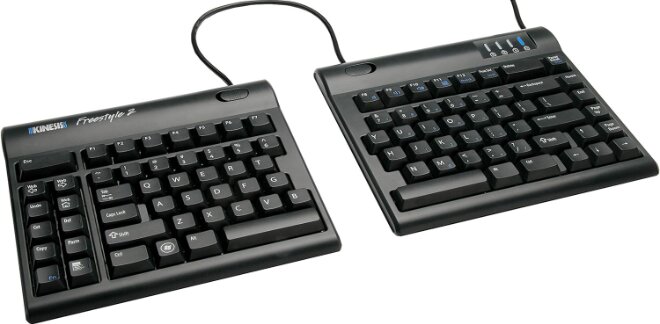
6. Kinesis Freestyle2 – Best Adjustable Split Keyboard

Pros
✓ Adjustable split separation
✓ Lightweight design
✓ Highly customizable positioning
✓ Proven ergonomic design
✓ Easy transportability
Cons
✕ Palm rests sold separately
✕ Less premium appearance
Specifications
| Feature | Specification |
|---|---|
| Separation | Up to 9 inches |
| Connectivity | Wired USB |
| Layout | Split ergonomic |
| Adjustable | Yes |
| Compatibility | Windows and Mac |
| Weight | Lightweight |
The Kinesis Freestyle2 offers something many ergonomic keyboards cannot: flexibility.
The two keyboard halves can be positioned independently, allowing users to find the exact placement that feels most comfortable for their shoulders, wrists, and arms.
This level of customization can be particularly beneficial for people recovering from repetitive strain injuries or seeking highly personalized ergonomic setups.
Bottom Line
The Kinesis Freestyle2 is ideal for users who want maximum positioning flexibility.
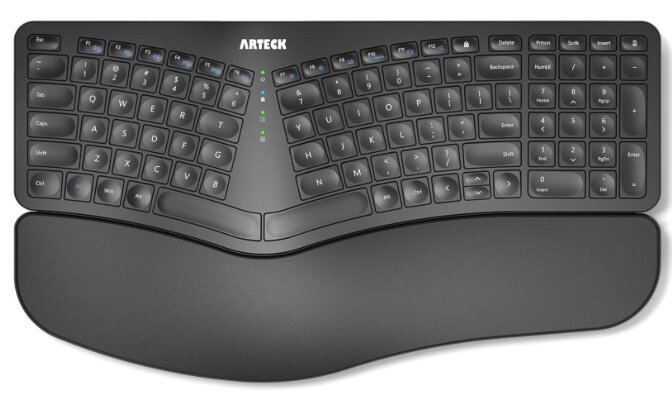
7. Arteck Split Ergonomic Keyboard – Best Budget Keyboard for Wrist Pain

Pros
✓ Affordable price
✓ Split ergonomic layout
✓ Cushioned wrist rest
✓ Wireless connectivity
✓ Easy setup
Cons
✕ Basic construction
✕ Fewer advanced ergonomic features
Specifications
| Feature | Specification |
|---|---|
| Connectivity | 2.4GHz Wireless |
| Layout | Split ergonomic |
| Wrist Rest | Integrated |
| Battery | Rechargeable |
| Compatibility | Windows |
| Price Range | Budget |
The Arteck Split Ergonomic Keyboard proves you do not need to spend hundreds of dollars to improve comfort.
The split design helps reduce wrist strain compared to traditional keyboards, while the integrated wrist support provides additional comfort during extended use.
Although it lacks the advanced engineering found in premium ergonomic models, it remains an excellent entry-level option for users seeking relief on a budget.
Bottom Line
If affordability is your top concern, the Arteck Split Ergonomic Keyboard is a strong budget-friendly choice.
Product Comparison Table
| Keyboard | Split Design | Wrist Rest | Wireless | Mechanical | Best For |
|---|---|---|---|---|---|
| Kinesis Advantage2 | Yes | Yes | No | Yes | Severe wrist pain |
| ProtoArc EKM01 Plus | Yes | Yes | Yes | No | Overall value |
| Logitech Ergo K860 | Yes | Yes | Yes | No | Premium comfort |
| Logitech Wave Keys | Partial | Yes | Yes | No | Mild discomfort |
| Razer Pro Type Ergo | Yes | Yes | Yes | Yes | Mechanical typing |
| Kinesis Freestyle2 | Yes | Optional | No | No | Custom positioning |
| Arteck Split Ergonomic | Yes | Yes | Yes | No | Budget buyers |
Why Ergonomic Keyboards Help Reduce Wrist Pain
Many traditional keyboards force your wrists into unnatural positions.
Over time, this can contribute to:
- Wrist fatigue
- Forearm tension
- Carpal tunnel symptoms
- Tendon irritation
- Hand discomfort
- Shoulder strain
Ergonomic keyboards attempt to address these issues through several design principles.
Split Layouts
Split keyboards allow your hands to remain shoulder-width apart, reducing inward wrist bending.
Tenting Angles
Many ergonomic keyboards raise the center of the keyboard to reduce forearm pronation.
Wrist Support
Integrated palm rests help maintain a neutral wrist position throughout the day.
Reduced Finger Travel
Advanced layouts place frequently used keys closer to natural finger resting positions.
Thumb Clusters
Keyboards like the Kinesis Advantage2 shift important functions to the thumbs, reducing strain on weaker fingers.
Common Mistakes People Make When Buying an Ergonomic Keyboard
Choosing Appearance Over Ergonomics
Some keyboards advertise ergonomic features while making only minor cosmetic changes.
True ergonomic keyboards significantly alter hand positioning.
Ignoring the Learning Curve
Highly ergonomic designs often require adaptation. Many users give up too early before experiencing the long-term benefits.
Focusing Only on Wrist Rests
While wrist rests help, overall keyboard geometry matters much more.
Keeping Poor Desk Ergonomics
Even the best keyboard cannot compensate for an improperly positioned desk or chair.
Frequently Asked Questions
What is the best keyboard for wrist pain?
The Kinesis Advantage2 is our top recommendation because of its deeply contoured ergonomic design, thumb clusters, and natural hand positioning.
Are split keyboards better for wrist pain?
In many cases, yes. Split keyboards help keep the wrists in a more neutral position and reduce inward bending.
Can an ergonomic keyboard help carpal tunnel symptoms?
Many users report improved comfort after switching to ergonomic keyboards. However, persistent pain should always be evaluated by a healthcare professional.
Is the Logitech Ergo K860 worth it?
Yes. The K860 offers excellent ergonomics, premium construction, and one of the easiest transitions from a traditional keyboard.
Are mechanical keyboards bad for wrist pain?
Not necessarily. Mechanical keyboards with lighter switches can reduce typing effort while providing excellent feedback.
How long does it take to adjust to an ergonomic keyboard?
Simple ergonomic keyboards may require only a few days. More advanced designs such as the Kinesis Advantage2 can take several weeks to master.
Who Should Buy Each Keyboard?
Choose the Kinesis Advantage2 if:
- You have persistent wrist pain
- You type all day
- You want maximum ergonomic benefits
- You are willing to adapt to a new layout
Choose the ProtoArc EKM01 Plus if:
- You want excellent value
- You need a keyboard and mouse combo
- You prefer wireless connectivity
Choose the Logitech Ergo K860 if:
- You want premium ergonomics
- You want a familiar typing experience
- You work from home or in an office
Choose the Logitech Wave Keys if:
- You have mild wrist discomfort
- You want an easy transition
- You prefer low-profile keys
Choose the Razer Pro Type Ergo if:
- You prefer mechanical switches
- You want premium productivity features
- You need wireless flexibility
Choose the Kinesis Freestyle2 if:
- You want customizable positioning
- You have unique ergonomic requirements
- You prefer a lightweight design
Choose the Arteck Split Ergonomic Keyboard if:
- You are on a budget
- You want to try ergonomic keyboards for the first time
- You need wireless functionality
Final Verdict
Choosing the best keyboard for wrist pain is ultimately about finding a design that promotes natural hand positioning and reduces unnecessary strain during long typing sessions.
After comparing all seven keyboards, the Kinesis Advantage2 earns our top recommendation. Its unique contoured key wells, thumb clusters, ergonomic architecture, and proven comfort advantages make it one of the most effective keyboards available for reducing wrist strain.
The ProtoArc EKM01 Plus takes second place thanks to its impressive combination of ergonomic features, wireless convenience, included mouse, and excellent value. For users seeking a premium mainstream option, the Logitech Ergo K860 remains one of the most comfortable and accessible ergonomic keyboards on the market.
Those looking for a gentler introduction to ergonomics should consider the Logitech Wave Keys, while mechanical keyboard enthusiasts may prefer the Razer Pro Type Ergo. The Kinesis Freestyle2 provides exceptional positioning flexibility, and the Arteck Split Ergonomic Keyboard offers an affordable entry point for budget-conscious buyers.
The right ergonomic keyboard will not magically solve every wrist issue, but it can significantly improve comfort, reduce strain, and make long hours at the computer much more manageable.
Our Final Rankings
- Kinesis Advantage2 – Best Overall Keyboard for Wrist Pain
- ProtoArc EKM01 Plus – Best Value Ergonomic Keyboard
- Logitech Ergo K860 – Best Premium Ergonomic Keyboard
- Logitech Wave Keys – Best for Mild Wrist Pain
- Razer Pro Type Ergo – Best Ergonomic Mechanical Keyboard
- Kinesis Freestyle2 – Best Adjustable Split Keyboard
- Arteck Split Ergonomic Keyboard – Best Budget Option
For most users experiencing wrist discomfort, the Kinesis Advantage2 offers the strongest combination of ergonomics, comfort, and long-term health benefits, making it our top choice for the best keyboard for wrist pain in 2026.
![5 Best Keyboards for Mac Mini [2026]](https://bestkeyboards.blog/wp-content/uploads/2026/06/Screenshot-2026-06-06-at-6.13.30-PM.jpg)
