
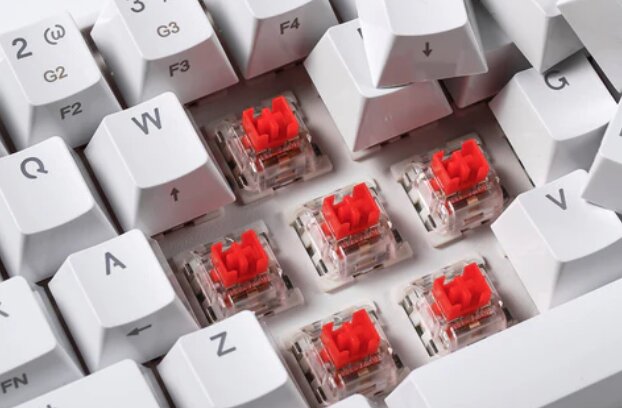
Mechanical keyboards have become the go-to choice for gamers, programmers, writers, and professionals who spend hours typing every day. Among the different switch types available, red switches remain one of the most popular thanks to their smooth linear feel, light actuation force, and fast key presses.
Unlike tactile or clicky switches, Red switches don’t produce a noticeable bump during each keystroke. That makes them excellent for fast-paced gaming while also providing a consistent typing experience that many users find less fatiguing during long sessions.
Of course, the switch isn’t the only thing that matters. Build quality, layout, connectivity, programmability, hot-swappable sockets, sound dampening, battery life, and overall typing feel all contribute to how enjoyable a keyboard is to use.
After comparing dozens of features across today’s most popular models, one keyboard stood out as the best overall choice for most users looking for a mechanical Red switch keyboard.
Our Top Recommendation: Keychron K10 HE
Why We Recommend It
The Keychron K10 HE combines everything we look for in a premium mechanical keyboard.
It offers a full-size layout, tri-mode wireless connectivity, Hall Effect magnetic switches, adjustable actuation, hot-swappable magnetic switches, QMK customization, premium PBT keycaps, and one of the smoothest typing experiences available today.
Unlike traditional mechanical keyboards that lock you into a fixed actuation point, the K10 HE allows you to customize how sensitive every key feels. Whether you’re gaming competitively or simply want a light typing experience for everyday work, it adapts remarkably well.
The addition of Bluetooth, 2.4GHz wireless, and USB-C wired connectivity also makes it equally suitable for desktops, laptops, tablets, and Mac users.
For anyone wanting a premium Red switch keyboard that excels in both gaming and productivity, the Keychron K10 HE is our top recommendation.
Best Mechanical Red Switch Keyboards: Our Top Picks
1. Keychron K10 HE – Best Overall Mechanical Red Switch Keyboard

Pros
✓ Ultra-smooth Hall Effect Silent Red switches
✓ Adjustable actuation for gaming and typing
✓ Bluetooth, 2.4GHz wireless, and USB-C connectivity
✓ Premium aluminum frame with wood accents
✓ Full-size layout with numpad
✓ Hot-swappable magnetic switches
✓ QMK programmable
✓ Excellent build quality
Cons
✕ Premium price
✕ Magnetic switches are not compatible with standard MX switches
Specifications
| Feature | Specification |
|---|---|
| Layout | Full Size (100%) |
| Switches | Keychron Ultra-Fast Lime Silent Red Magnetic |
| Connectivity | Bluetooth 5.2, 2.4GHz, USB-C |
| Hot Swappable | Yes (Magnetic) |
| Programmable | QMK / Keychron Launcher |
| Keycaps | Double-shot PBT |
| Compatibility | Windows, macOS, Linux |
If you’re searching for a mechanical keyboard that does almost everything well, it’s difficult to find a better option than the Keychron K10 HE.
The biggest highlight is its Hall Effect magnetic switch technology. Rather than relying on traditional mechanical contacts, these switches use magnetic sensors that allow each key’s actuation point to be adjusted. You can configure ultra-sensitive key presses for competitive gaming or increase the actuation distance to reduce accidental presses while typing.
The Silent Red magnetic switches feel exceptionally smooth from top to bottom. Since they’re linear, there’s no tactile bump interrupting each keystroke, resulting in a fluid typing experience that’s equally enjoyable for gaming and productivity.
Wireless performance is equally impressive. Bluetooth 5.2 supports multiple devices, while the included 2.4GHz receiver offers low-latency performance that’s responsive enough for fast-paced games. If you prefer a wired setup, USB-C provides a stable connection with no need to worry about battery life.
Build quality also exceeds expectations. The aluminum construction gives the keyboard a sturdy, premium feel, while the rosewood side accents add a unique touch that helps it stand out from the sea of black gaming keyboards.
Customization is another area where the K10 HE shines. Through the Keychron Launcher and QMK support, you can remap every key, create macros, adjust actuation distances, enable Rapid Trigger, and tailor the keyboard to fit your workflow.
The full-size layout is another major advantage. Having a dedicated number pad makes the keyboard just as practical for office work, programming, and data entry as it is for gaming.
It’s not the least expensive keyboard on this list, but the combination of premium construction, advanced switch technology, and outstanding versatility makes it well worth the investment.
Bottom Line: If you want the best mechanical Red switch keyboard in 2026, the Keychron K10 HE offers the strongest balance of typing feel, gaming performance, customization, and everyday usability.
2. Keychron V6 8K – Best Wired Mechanical Red Switch Keyboard

Pros
✓ Extremely fast 8000Hz polling rate
✓ Fully programmable with QMK
✓ Hot-swappable MX-compatible sockets
✓ Excellent acoustic dampening
✓ Durable PBT keycaps
✓ Full-size layout with programmable knob
Cons
✕ Wired only
✕ Heavier than most keyboards
Specifications
| Feature | Specification |
|---|---|
| Layout | Full Size |
| Connectivity | USB-C Wired |
| Polling Rate | 8000Hz |
| Hot Swappable | Yes |
| Programmable | QMK / Keychron Launcher |
| Keycaps | Double-shot PBT |
| RGB | Per-Key RGB |
For users who prefer a wired keyboard, the Keychron V6 8K delivers an exceptional experience that rivals far more expensive custom keyboards.
Its standout feature is the incredibly fast 8000Hz polling rate, which dramatically reduces input latency compared to standard keyboards. While casual users may not notice the difference, competitive gamers and enthusiasts who value responsiveness will appreciate the extra precision.
Typing also feels refined thanks to the keyboard’s thoughtful internal construction. Multiple layers of acoustic foam help reduce unwanted hollow sounds, while upgraded stabilizers make larger keys like the spacebar, Enter, and Shift feel smooth and consistent.
One of the biggest advantages of the V6 8K is its hot-swappable PCB. Since it supports both 3-pin and 5-pin MX-style switches, you can easily swap to your preferred Red switches without any soldering. That flexibility makes it a fantastic long-term investment for keyboard enthusiasts who enjoy experimenting with different switch options.
Customization is another strong point. QMK firmware allows virtually every key to be remapped, macros to be created, and shortcuts to be customized for gaming, programming, editing, or productivity.
The included programmable rotary knob adds another layer of convenience. Out of the box it controls media volume, but it can easily be reassigned to zoom functions, scrolling, timeline navigation, brush size adjustments, or virtually any other command.
The only real limitation is its lack of wireless connectivity. If you specifically want Bluetooth support, one of the wireless models on this list will be a better fit.
Still, if you don’t mind using a cable, the V6 8K delivers one of the best typing experiences available today.
Bottom Line: The Keychron V6 8K is the best wired mechanical Red switch keyboard for users who prioritize speed, customization, and premium typing feel.
3. Cherry KC 200 MX – Best Quiet Mechanical Red Switch Keyboard

Pros
✓ Genuine CHERRY MX2A Silent Red switches
✓ Exceptionally quiet typing
✓ Professional office-friendly design
✓ Durable aluminum top plate
✓ Laser-etched keycaps
✓ Full N-key rollover and anti-ghosting
Cons
✕ Wired only
✕ Minimal RGB customization
Specifications
| Feature | Specification |
|---|---|
| Layout | Full Size |
| Switches | CHERRY MX2A Silent Red |
| Connectivity | USB-A Wired |
| Construction | Aluminum top plate |
| Anti-Ghosting | Yes |
| N-Key Rollover | Full |
| Compatibility | Windows |
Not every mechanical keyboard needs flashy RGB lighting or aggressive gaming aesthetics. The Cherry KC 200 MX takes a more understated approach, making it an excellent choice for offices, shared workspaces, and anyone who prefers a quieter typing experience.
At the heart of the keyboard are genuine CHERRY MX2A Silent Red switches, which retain the smooth linear feel that Red switches are known for while significantly reducing noise. The result is a satisfying mechanical typing experience that’s much less disruptive to coworkers or family members.
Typing feels stable and consistent thanks to the sturdy aluminum top plate. Larger keys are well-balanced, and the overall construction gives the keyboard a solid, premium feel that inspires confidence during daily use.
Rather than focusing on decorative lighting effects, Cherry emphasizes practicality. Dedicated shortcut keys provide quick access to volume controls and the calculator, while white status LEDs clearly indicate when functions such as Caps Lock or Num Lock are active.
Durability is another highlight. The MX2A switches are rated for more than 50 million keystrokes, and the laser-etched keycaps resist fading over years of heavy use. Combined with full N-key rollover and anti-ghosting, the keyboard remains reliable whether you’re typing documents, writing code, or enjoying the occasional game.
The biggest compromise is the lack of wireless connectivity and advanced RGB customization. However, those omissions may not matter to users who simply want a dependable mechanical keyboard with excellent typing characteristics.
Bottom Line: If you want the quietest mechanical Red switch keyboard for work or home office use, the Cherry KC 200 MX is one of the best options available.
4. HyperX Alloy Origins Core – Best Tenkeyless Mechanical Red Switch Keyboard

Pros
✓ Smooth HyperX Red linear switches
✓ Compact tenkeyless design
✓ Aircraft-grade aluminum body
✓ Bright per-key RGB lighting
✓ Excellent build quality
✓ Reliable gaming performance
Cons
✕ No wireless connectivity
✕ No dedicated numpad
Specifications
| Feature | Specification |
|---|---|
| Layout | Tenkeyless (87 Keys) |
| Switches | HyperX Red Linear |
| Connectivity | USB Wired |
| Construction | Aircraft-grade Aluminum |
| RGB | Per-Key RGB |
| Software | HyperX NGENUITY |
| Compatibility | Windows |
The HyperX Alloy Origins Core has remained one of the most respected tenkeyless mechanical keyboards for good reason. It focuses on delivering a premium typing and gaming experience without adding unnecessary features that inflate the price.
Its compact layout immediately frees up valuable desk space. By removing the number pad, your mouse sits closer to the keyboard, reducing arm movement during long gaming sessions and making the setup feel more ergonomic for many users.
The HyperX Red switches are light, smooth, and highly responsive. Since they feature a linear design, every keystroke feels consistent from top to bottom without the tactile bump found on Brown switches or the audible click of Blue switches. Fast double taps and rapid key presses feel effortless, making the keyboard especially enjoyable for FPS and competitive games.
Build quality is another major strength. The full aluminum body gives the keyboard a reassuring amount of rigidity, eliminating flex while providing a premium feel that many budget keyboards simply can’t match.
RGB lighting is vibrant and fully customizable through HyperX’s NGENUITY software. Users can personalize lighting effects, assign macros, and create custom profiles for different games or applications.
Although the keyboard was designed with gamers in mind, it also performs well for programming, writing, and everyday office work. The smooth switches help reduce finger fatigue during extended typing sessions, and the compact footprint leaves more room for notebooks, tablets, or other desk accessories.
Its biggest limitation is the lack of wireless connectivity and a numeric keypad. Users who regularly work with spreadsheets or financial data may find a full-size layout more practical.
Bottom Line: If you prefer a compact desk setup and want one of the best tenkeyless Red switch keyboards available, the HyperX Alloy Origins Core is an outstanding choice.
5. AULA F75 – Best 75% Mechanical Red Switch Keyboard

Pros
✓ Compact 75% layout
✓ Triple-mode wireless connectivity
✓ Excellent sound dampening
✓ Hot-swappable switches
✓ Large 4000mAh battery
✓ Convenient multifunction knob
Cons
✕ No dedicated numpad
✕ Software isn’t as polished as premium brands
Specifications
| Feature | Specification |
|---|---|
| Layout | 75% (81 Keys) |
| Connectivity | Bluetooth 5.0, 2.4GHz, USB-C |
| Hot Swappable | Yes |
| Battery | 4000mAh |
| RGB | 16.8 Million Colors |
| Programmable | Yes |
| Compatibility | Windows, macOS, Android, iOS |
Compact mechanical keyboards continue to grow in popularity, and the AULA F75 demonstrates why so many users are making the switch.
Despite its smaller footprint, it retains the dedicated arrow keys and function row that many 60% keyboards sacrifice. This makes it significantly easier to use for both productivity and gaming without occupying nearly as much desk space as a traditional full-size keyboard.
One of the most surprising aspects of the F75 is its typing feel. Thanks to its five-layer internal sound dampening, integrated silicone padding, and pre-lubricated stabilizers, each key press produces a deep, refined sound that’s far more premium than its price would suggest.
The keyboard also supports Bluetooth, 2.4GHz wireless, and USB-C wired operation, allowing you to switch effortlessly between multiple computers, tablets, and smartphones. This flexibility makes it equally useful for workstations and portable setups.
Customization is another area where the F75 performs well. Hot-swappable sockets allow users to install compatible Red switches or experiment with different switch types without soldering. RGB lighting offers millions of colors along with numerous animated effects, while the multifunction knob provides quick access to volume controls and lighting adjustments.
For users who value portability, the smaller layout is a major advantage. It fits comfortably on smaller desks while leaving plenty of room for mouse movement during gaming.
The only notable drawback is the absence of a numeric keypad, which may be inconvenient for users who frequently enter numerical data.
Bottom Line: The AULA F75 is an excellent compact Red switch keyboard for users who want premium typing feel, wireless flexibility, and outstanding value.
6. AULA F108 Pro – Best Budget Full-Size Mechanical Red Switch Keyboard

Pros
✓ Full-size layout with numpad
✓ Built-in TFT display
✓ Multifunction control knob
✓ Triple-mode wireless connectivity
✓ Massive 8000mAh battery
✓ Excellent value for money
Cons
✕ Driver software is Windows-only
✕ Display customization requires wired mode
Specifications
| Feature | Specification |
|---|---|
| Layout | Full Size (104 Keys) |
| Connectivity | Bluetooth 5.0, 2.4GHz, USB-C |
| Battery | 8000mAh |
| Hot Swappable | Yes |
| RGB | 16.8 Million Colors |
| Display | TFT Color Screen |
| Compatibility | Windows, macOS, Android, iOS |
The AULA F108 Pro packs an impressive number of premium features into a surprisingly affordable package.
Its standout feature is the built-in TFT display positioned in the upper corner of the keyboard. Rather than serving as a simple novelty, it provides useful information such as battery status, connection mode, date, time, lighting effects, and even supports custom GIF animations for users who enjoy personalizing their setup.
The multifunction knob further enhances usability by providing quick access to volume controls, RGB adjustments, and various system functions without relying on keyboard shortcuts.
Typing is equally enjoyable thanks to the keyboard’s layered sound-dampening structure and pre-lubricated switches. The resulting keystrokes feel soft, stable, and pleasantly smooth while producing the creamy sound profile that has become increasingly popular among keyboard enthusiasts.
Wireless performance is another highlight. Bluetooth, 2.4GHz wireless, and USB-C connectivity allow the keyboard to transition seamlessly between multiple devices, making it suitable for home offices, gaming PCs, laptops, and tablets alike.
Battery life is particularly impressive. The integrated 8000mAh battery easily outlasts many competing wireless keyboards, allowing extended use between charges even with RGB lighting enabled.
Its full-size layout is another major advantage for productivity users. Dedicated navigation keys, function keys, and a number pad make it ideal for office work, coding, spreadsheets, and content creation while still providing excellent gaming performance.
Although some advanced customization features require Windows software and a wired connection, most users are unlikely to view this as a major drawback considering everything else the keyboard offers.
Bottom Line: If you’re looking for the best budget-friendly full-size mechanical Red switch keyboard with premium features, the AULA F108 Pro is one of the strongest values available today.
Product Comparison Table
| Keyboard | Layout | Wireless | Hot Swappable | Red Switch Type | Best For |
|---|---|---|---|---|---|
| Keychron K10 HE | Full Size | Bluetooth / 2.4GHz / USB-C | Yes (Magnetic) | Silent Red Magnetic | Best Overall |
| Keychron V6 8K | Full Size | No | Yes | MX-Compatible Red | Best Wired |
| Cherry KC 200 MX | Full Size | No | No | Cherry MX2A Silent Red | Quiet Offices |
| HyperX Alloy Origins Core | TKL | No | No | HyperX Red | Competitive Gaming |
| AULA F75 | 75% | Bluetooth / 2.4GHz / USB-C | Yes | Linear Compatible | Compact Setups |
| AULA F108 Pro | Full Size | Bluetooth / 2.4GHz / USB-C | Yes | Linear Pre-lubed | Best Value |
Frequently Asked Questions
What is the best mechanical Red switch keyboard?
The Keychron K10 HE is our top recommendation thanks to its premium build quality, Hall Effect Silent Red switches, adjustable actuation, tri-mode connectivity, and extensive customization options. It performs exceptionally well for both gaming and everyday productivity.
Are Red switches good for typing?
Yes. Red switches have a smooth linear action with no tactile bump, making them comfortable for long typing sessions. Many users appreciate their light actuation force, which can reduce finger fatigue during extended use.
Are Red switches better for gaming?
Red switches are widely considered one of the best options for gaming because their linear travel allows rapid key presses and repeated inputs without tactile resistance. They are especially popular among FPS and competitive gamers.
What’s the difference between Silent Red and regular Red switches?
Silent Red switches use internal dampening materials to reduce the sound produced when pressing and releasing keys. They maintain the same smooth linear feel while operating much more quietly than standard Red switches.
Are Hall Effect Red switches better than traditional mechanical switches?
Hall Effect switches offer several advantages, including adjustable actuation, Rapid Trigger support, and exceptional durability since they don’t rely on physical electrical contacts. However, traditional mechanical Red switches still provide an excellent typing experience and are compatible with a wider range of aftermarket components.
Do Red switches make a lot of noise?
Standard Red switches are relatively quiet compared to Blue switches because they don’t produce an audible click. Silent Red switches reduce the noise even further, making them suitable for offices and shared workspaces.
Should I buy a wired or wireless mechanical keyboard?
Wired keyboards offer maximum stability and don’t require charging, making them ideal for competitive gaming. Wireless keyboards provide greater flexibility, cleaner desk setups, and excellent battery life. Modern 2.4GHz wireless keyboards perform nearly as well as wired models for most users.
Are hot-swappable keyboards worth it?
Yes. Hot-swappable keyboards allow you to replace switches without soldering, making it easy to customize the typing feel or replace worn switches in the future. They’re especially appealing for enthusiasts who like experimenting with different switch types.
Are Red switches good for programming?
Absolutely. Many programmers enjoy Red switches because of their smooth keystrokes and consistent feel. While some developers prefer tactile Brown switches, Red switches remain a popular choice for long coding sessions.
Can I use a gaming mechanical keyboard for work?
Yes. Many gaming keyboards offer excellent typing experiences in addition to gaming performance. Features like programmable keys, premium keycaps, and wireless connectivity make them equally suitable for office work, programming, writing, and general productivity.
Mechanical Red Switch Buying Guide
Choosing the best mechanical Red switch keyboard isn’t just about finding the smoothest switches. Several other features can have just as much impact on your overall experience.
Layout
The first decision is keyboard size.
- Full-size (100%) keyboards include a numpad and are ideal for office work, spreadsheets, programming, and anyone who regularly enters numbers.
- Tenkeyless (TKL) keyboards remove the numpad to free up desk space while keeping the function row and navigation keys.
- 75% layouts offer an excellent middle ground by retaining dedicated arrow keys in a much smaller footprint.
Connectivity
If your keyboard never leaves your desk, a wired model like the Keychron V6 8K or Cherry KC 200 MX offers maximum stability and requires no charging.
For cleaner setups or multi-device users, wireless models such as the Keychron K10 HE, AULA F75, and AULA F108 Pro provide Bluetooth, 2.4GHz wireless, and USB-C connectivity for excellent flexibility.
Hot-Swappable Switches
A hot-swappable keyboard lets you replace switches without soldering. This makes maintenance easier and gives you the freedom to experiment with different switch types later on.
Build Quality
Look for features such as:
- PBT keycaps
- Aluminum construction
- Sound-dampening foam
- Quality stabilizers
- Programmable software
- RGB customization (if desired)
A keyboard with solid construction often feels more stable, sounds better, and lasts significantly longer than entry-level models.
Red Switch vs Brown vs Blue Switches
Although this guide focuses on Red switches, it’s worth understanding how they compare to the two other common mechanical switch types.
| Switch | Feel | Noise | Best For |
|---|---|---|---|
| Red | Linear | Quiet | Gaming, general typing |
| Brown | Tactile | Moderate | Mixed productivity and typing |
| Blue | Clicky | Loud | Users who enjoy audible feedback |
Red Switches
Red switches have a smooth linear travel with no tactile bump or click. Their light actuation force allows fast repeated keystrokes, making them a favorite among gamers. They’re also comfortable for long typing sessions thanks to their consistent key feel.
Brown Switches
Brown switches introduce a small tactile bump during each key press. This subtle feedback helps many users know exactly when a key has actuated, making them popular with programmers, writers, and office workers who type extensively.
Blue Switches
Blue switches are known for their loud click and pronounced tactile feedback. While many enthusiasts enjoy their satisfying sound, they can be distracting in shared offices or quiet environments.
For most users looking for a balance between gaming and productivity, Red switches remain the most versatile choice, especially if you prefer a smooth and uninterrupted typing experience.
Final Verdict
Choosing the best mechanical Red switch keyboard ultimately comes down to your preferred layout, connectivity, and budget.
After comparing all six keyboards, the Keychron K10 HE earns our top recommendation. Its adjustable Hall Effect Silent Red switches, full-size layout, tri-mode connectivity, premium materials, and extensive customization make it one of the most capable mechanical keyboards available in 2026. Whether you’re gaming, programming, or working all day, it delivers an exceptional experience.
If you prefer a wired setup, the Keychron V6 8K stands out with its ultra-fast 8000Hz polling rate, hot-swappable design, and excellent acoustic tuning. For quieter work environments, the Cherry KC 200 MX offers genuine Cherry Silent Red switches and a refined office-friendly design.
Users who prefer compact keyboards should consider the HyperX Alloy Origins Core for a tenkeyless layout or the AULA F75 for an outstanding 75% wireless option. Meanwhile, the AULA F108 Pro delivers excellent value by combining a full-size layout, large battery, hot-swappable switches, and a built-in display at an affordable price.
Our Final Rankings
- Keychron K10 HE – Best Overall Mechanical Red Switch Keyboard
- Keychron V6 8K – Best Wired Mechanical Keyboard
- Cherry KC 200 MX – Best Quiet Mechanical Keyboard
- HyperX Alloy Origins Core – Best Tenkeyless Keyboard
- AULA F75 – Best 75% Mechanical Keyboard
- AULA F108 Pro – Best Budget Full-Size Mechanical Keyboard
No matter which model you choose, upgrading to a quality mechanical keyboard with Red switches can significantly improve both gaming performance and everyday typing comfort. For most users, the Keychron K10 HE offers the strongest combination of smooth linear switches, premium construction, and long-term versatility, making it our top pick for the best mechanical Red switch keyboard in 2026.
![5 Best Keyboards for Mac Mini [2026]](https://bestkeyboards.blog/wp-content/uploads/2026/06/Screenshot-2026-06-06-at-6.13.30-PM.jpg)
